SweepMe! 1.6 Enters Its Closed Beta Phase
We are excited to announce that SweepMe! 1.6 is now available for testing. It is the biggest release since the 1.5 series started more than eight years ago, and we would like to invite you to try it in your own lab before the official release.
The beta is closed: it can be downloaded by every registered user with a SweepMe! account, but it is not yet distributed through the usual update channel or the Web Installer. Please see the installation instructions further below.
Control SweepMe! with Your AI Tool
SweepMe! 1.6 comes with a dedicated MCP interface. MCP is the Model Context Protocol, the standard that AI assistants such as Claude use to talk to external tools. Open the Interfaces dialog, copy the URL shown there into your AI client, and you are done. There is no plugin to install and no extra setup. From then on, the assistant can work with your running SweepMe! instance: It can read values, load settings, start and monitor measurements.
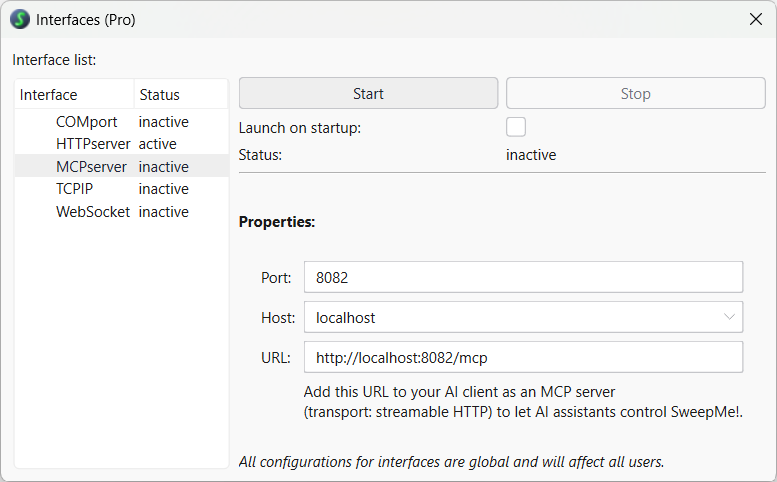
The Interfaces tool with new MCP support in SweepMe! Pro.
Modernized Software Foundation and New Look
The application now runs on Python 3.14 and PySide6. The matching pysweepme 1.6.1.1 is already available on PyPI, so the drivers you load into your own Python projects stay in step with the version SweepMe! itself uses.
SweepMe! 1.6 also follows our new brand design: an updated SweepMe! logo, refreshed icons, and a cleaner interface throughout — starting with a new splash screen at startup.
Coming Soon: Setting Files in JSON Format
One of the larger changes of the 1.6 series is not part of this first beta yet, but we would like to give you a preview already. SweepMe! will get a new setting file format that is compatible with JSON. It will be available in a few weeks time. We’ll let you know when you can test it yourself.
The benefit: a JSON-based format is far easier to work with programmatically. It becomes much simpler to create perfectly functional settings with AI tools, and you will be able to copy and paste snippets of a setting from one file to another or share them with colleagues.
Please note that this step will partially break backwards compatibility. The new SweepMe! version will still read your existing setting files, but setting files saved with SweepMe! 1.6 cannot be opened with older versions.
Please Note: Changes to the Free Version
In the free version, the sequencer is now limited to one active branch. Multiple branches remain available in SweepMe! Pro.
How to Install the Beta
The beta version is in its first public testing phase and not meant for production. It is shipped as a self-extracting ZIP archive, not as an installer. It is not offered under Help & Info → Update and cannot be installed with the WebInstaller. Extracting it manually keeps the beta completely separate from your productive installation, so both versions can exist side by side.
1. Download the archive Log in to your account at sweep-me.net and open your Dashboard. There you find the beta archive at SweepMe! beta versions and release candidates.
2. Run the archive Double-click the downloaded file. Windows may show a SmartScreen warning — choose More info → Run anyway. The file only unpacks its content: no installer is executed, and no administrator rights are required.
3. Choose a target folder Extract into a new, empty folder. Please do not extract into the folder of your existing SweepMe! 1.5.x installation and avoid C:\Program Files, as the beta needs write access to its own folder.
4. Start SweepMe! Open the extracted folder and run SweepMe!.exe. Create a desktop shortcut or Start menu entry manually, if you like. File associations (e.g. for .set files) still point to your installed 1.5.x version.
5. Work in parallel with your productive version Your existing installation stays untouched and remains your working environment. Settings created or saved with 1.6 may not load correctly in 1.5.x, so please keep a copy of the setting files you use for testing.
6. Removing the beta Simply delete the extracted folder. Nothing else is left on your system.
What We Would Like You to Test
A beta is a beta. Please do not use this version in your productive setup yet. Instead, please:
- Load your existing settings and check that all modules and parameters are restored correctly.
- Run your drivers, especially self-written or customized ones, against the new Python 3.14 environment.
- Try the new MCP interface with your AI client of choice.
- Tell us anything that looks, feels, or behaves differently than expected.
- Let us and the world know if you enjoy the new look and functionality.

Every report from your lab makes the final release more stable. We are grateful for every piece of feedback.
 Download the beta from your Dashboard and let us know what you find.