New Feature in SweepMe! Pro: Change Tracking for Public Folder
We would like to introduce a new feature in SweepMe! version 1.5.7.8 that enhances stability and reproducibility for professional environments: Change Tracking for the Public SweepMe! folder.
SweepMe! users often work with settings, custom drivers, custom function scripts, and more stored in the Public SweepMe! folder. Until now, these files had no versioning system, making it difficult to recover from accidental changes or deletions. With Change Tracking, available to SweepMe! Pro subscribers, this limitation is addressed.
 What does Change Tracking do?
When enabled, SweepMe! will automatically create snapshots of your Public folder for any changes:
- When you start a measurement
- When you close SweepMe!
These snapshots allow you to restore previous versions of your settings, drivers, or custom scripts. You can access them via the Options dialog in the Change Tracking tab, right-click on a snapshot, and select “Restore to folder…”. This will extract the snapshot to a new directory, ensuring your current work remains untouched.
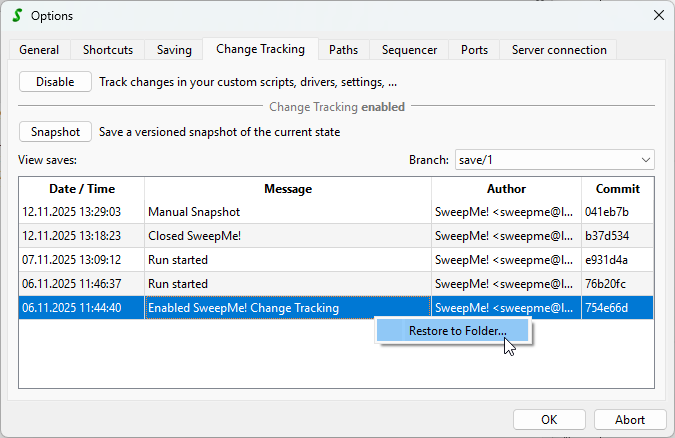
Note: SweepMe! will not restore directly into the Public SweepMe! folder to avoid overwriting your recent changes.
 What is not tracked?
To keep things efficient and focused:
- Measurement data folders are excluded (they can grow large and are append-only).
- Screenshots folder is also excluded (this will be introduced in an upcoming feature).
 Reproducibility and Snapshot Hashes
For reproducibility of your measurements, SweepMe! always saves the setting file along with your measurement data. To match the measurement to the exact versions of custom drivers or function scripts used, the snapshot hash is embedded in the header of the saved setting file. For example:
#SweepMe!v1.5.7.8
# Repository hash: b37d534
This hash corresponds to the most recent snapshot taken at the time of the measurement. By referencing this hash in the snapshot list (e.g., from November 7th in the screenshot above), you can restore the exact state of your custom code and configuration used during that measurement.
 For advanced users
Change Tracking uses git under the hood, turning your Public folder into a local git repository. There is no remote synchronization.
If you already use git in your workflow or your company manages the folder via git, we recommend disabling SweepMe! Change Tracking to avoid conflicts.
Also:
- Symbolic links are not tracked.
- You may use git tools (e.g., GitExtensions) to inspect and work in the repository, but ensure you’re on the default
save/1branch before launching SweepMe! again. - Avoid manual commits or checkouts involving symbolic links, as git may not handle them correctly and data may be lost.
We hope this feature helps you maintain a more robust and reproducible measurement environment. If you have feedback or questions, feel free to share them!