Hi Benjamin,
I remember your question and re-watched the recording of the meeting (We still plan to release helpful snippets).
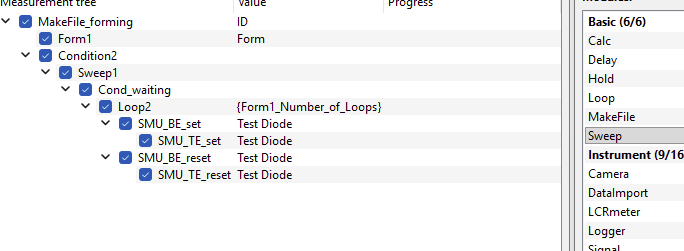
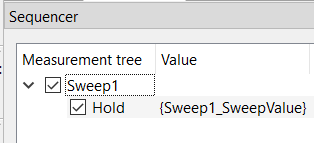
The idea was to use a combination of Sweep module for arbitray value definition and Hold (or Delay) to perform the waiting:
Here is JSON string that you can copy and paste to your sequencer. It will handover the value of the Sweep module to the Hold module using the parameter syntax.
{
  "child_items": [
    {
      "child_items": [
        {
          "child_items": [],
          "is_checked": true,
          "is_expanded": true,
          "module_details": {
            "module_type": "Hold",
            "Label": "Hold",
            "value": "{Sweep1_SweepValue}",
            "Comment": ""
          }
        }
      ],
      "is_checked": true,
      "is_expanded": true,
      "module_details": {
        "module_type": "Sweep",
        "Label": "Sweep1",
        "value": "",
        "SweepValue": "SweepBox",
        "Plot": true,
        "Save": true,
        "SweepEditor": {
          "sweeps": [
            {
              "loop": "0",
              "start": "0.0",
              "end": "0.0",
              "step_points": "0.1",
              "scaling": "Step width",
              "hold": "0.0"
            }
          ]
        },
        "SweepBox": {
          "sweep_values": "0, 1, 2, 5, 10, 20"
        },
        "Comment": ""
      }
    }
  ],
  "data_type": "Sequencer",
  "version": "v1"
}
You can then add your measurement procedure in a second branch right after the Hold.
If you like to wait a defined time between two measurements, Hold is better. It is waiting exactly the given time. The Hold time is applied between the apply and measure phase. If Hold is in its own branch, it just adds a defined waiting time.
Delay can be used if you like to start measurement after certain time points. Delay remembers the timestamp when it got active first time and the waits the given delay time with respect to the last taken timestamp. This way, one can for example, start a measurement every second, or every minute. However, when the measurment takes more time than the delay time, delay will have no effect.
Let us know if you look for something else.
Thanks and best, Axel