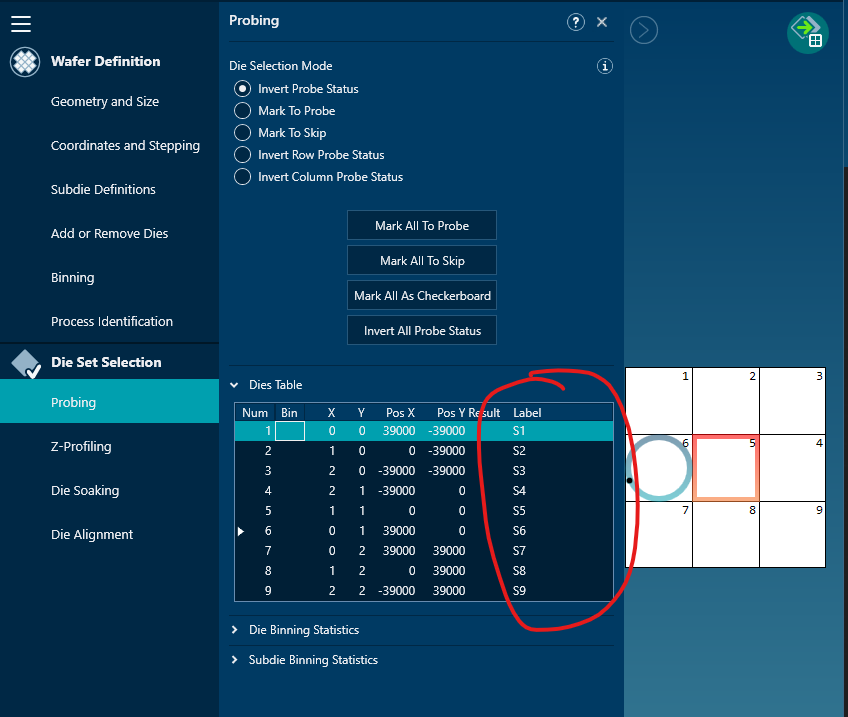
I would like to ask if there is anything we can do to read labels from the velox wafermap. The labels are assigned in the probing section where each die coordinates has unique labels set by the user. This will help to populate labels in sweep me to accurately identify the dies. I’m attaching a screenshot taken from velox.
You can extend the functionality of existing SweepMe! drivers by creating a custom version of the driver.
To do this, open Tools → Version Manager, select the relevant driver, then right-click on the driver version you want to use as a base and choose “Create custom version”.
This will copy the driver to C:\Users\Public\Documents\SweepMe!\CustomDevices,
where it can be freely modified (official driver versions are read-only).
From the Version Manager, you can right-click the custom driver and open it in the editor to add your own functions.
For wafer probers, each driver provides a function called get_probeplan, which retrieves information about the wafer, dies, and subsites from the device. In this context, the most suitable place to add custom logic for handling die labels is the get_die_list function. There, you can query and process additional information such as die labels (e.g. via GetDieLabel) and make it available within SweepMe!.
Please note that the values from the die table are also used internally to select the next die during a sweep. If you add labels to the die name purely for display purposes, make sure to remove or strip them again before triggering the move to the next die. Otherwise, the prober may raise an error if the die coordinates contain unexpected additional information.