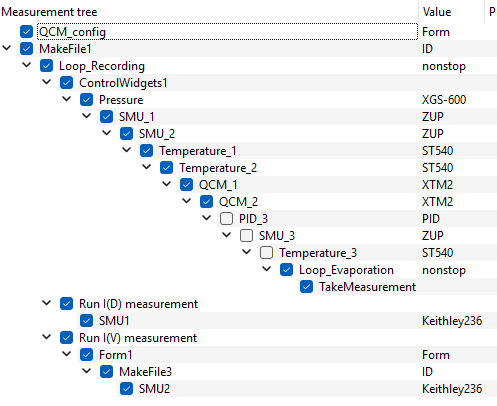
I’m again running into an issue trying to combine an evaporation controll with measurements:
I would like to continously loop a certain part of my sequencer to controll and log the evaporation. I then have two measurement scenarios I would like to toggle between:
Continously record Current during film deposition I(d)
Record I(V) after certain steps in the deposition
I’m using the ControlWidget to have two toggle buttons: one to select the measurement (I(d)/I(V)) and another one to toggle the measurement on/off in general. I’m catching the measurement with the ‘TakeMeasurement’ condition and have a dedicated condition for each measurement.
The issue I face is that I can start taking measurements but then my recording/controll of the evaporation is halted.
Am I missing something obvious or is this currently not supported?
Best,
Jörn
basically, your sequencer looks good. You have a Loop_Evaporation to keep the evaporation control running. The Condition “TakeMeasurement” can be used to skip the main evaporation control branch. The Loop_Recording make sure to repeat the entire procedure after the measurement has been finished to come back to the evaporation control.
If I understand you correctly, you would like to continue with the evaporation control while the measurement is running.
This can be done by moving those modules in your main evaporation control branch up and making them part of all three branches. This way they remain active, i.e. instruments are not unconfigured and will continue to do their task.
It also means that the three branches should only differ in those modules that have to change between the branches. For example, SMU_1 and SMU_2 that are probably used to track current during the evaporation should be very much at the end of the main evaporation control branch, while Pressure, QCMs, Temperature can be part of all three branches.
Basically, by changing branches, you are then just changing the SMUs that are currently active being the one that are permanently logged or the ones that run the IV curves.
Another solution can be to use two instances of SweepMe! (possible since 1.5.6), one that controls the evaporation and another for logging currents and running IV curves. Drawback is however that both instances cannot access the same instruments simultaneously. Your IV logging data would then not be related to your evaporation and film thickness data and one would need to match timestamps later on.
Hope this helps to continue. Otherwise let us know when you need further explanation. Or feel free to share your setting as json string here in the forum just by selecting all modules in the sequencer and copy them via the right-click menu to paste it here into a code element.
One more note on using Toggle Buttons from the ControlWidgets module. These buttons work like state indicators that are readout at each iteration step of the sequencer and the current value is returned at end of each measurement point similar to a measurement result of a driver.
If your Condition uses Execution “Always”, it will check before and after a measurement point whether the condition is met. This can lead to problems as the you might have changed the ControlWidgets Toggle Button back to the previous state, but this information is not available at the beginning of the first iteration when you are back at your main evaporation control branch. Then, the Condition would immediately trigger again. The trick is to change the condition to “At the end” to make the evaluation at the end of a measurement point. You can also put your ControlWidgets module such that it is part of all branches. This way the last known value is updated more frequently and even before you enter again your main evaporation control branch.