I came across an issue regarding SweepMe! 1.5.7.8. When starting a routine the program sometimes crashes without any notice. The “sometimes” means, that when I (close and) open the program and load the setting, sometimes it works, sometimes it crashes. I also did not find anything new in the log after a crash.
Some additional information:
I do get a weird error in the debug when starting SweepMe!, that states, “repository path ‘…/Public/Documents/SweepMe!/’ is not owned by current user”
My routine consists of 2 SMUs and a spectromer, which I all used at least 2 times in the tree. I have the feeling that this issue could be caused by having the spectrometer twice in the tree.
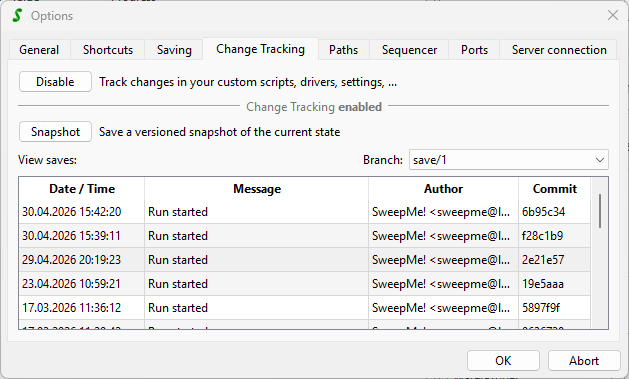
This feature will track all changes in the public SweepMe! folder like settings or customer drivers.
If there is any file lost or corrupted, you can restore an earlier version easily, by right-clicking into an record item in the above list.
Because of the “repository path” in your debug message, it might be related.
In version 1.5.7.9 there was an improvement released that allows to use Change tracking across different OS users.
My recommendation would be to update to 1.5.7.13 or even better go ahead with SweepMe! 1.5.8 that you can install in parallel. Then, check whether it works.
One could also disable the Change tracking to see whether it has an effect, but in general it is a good idea to keep it on.
Hope this helps, otherwise let us know and will dive deeper into it.
so I updated the SweepMe! Version to 1.5.7.13 and the problem still exists.
The first problem (which I have resolved) was that the “SweepMe” folder (under “Public Documents”) contained several compressed folders with severely restricted access. Only one person (with the exception of administrators) can view or edit each folder. These folders are usually located in the ‘Measurement’ folder, but are sometimes found in ‘CustomFunctions’ and so on. Is there a way to create an archive within SweepMe! that generates such ‘defective’ folders?
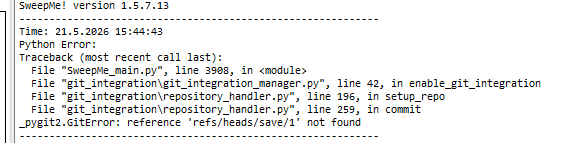
With this fixed I get a new error message regarding the repository:
SweepMe! does not have any function to compress or restrict access to folders in the Public Documents\SweepMe! folder.
Can you check the detailed permissions of this folder? There should be an entry granting “Full Access” to “Everyone”, and this should be inherited to all subfolders and files. Maybe also check the permissions on the debug.log and the startup_error.log.
About the GitError: It seems the repository is in an inconsistent state which SweepMe! cannot handle. Have there also been these defective folders in the (hidden) .git subfolder? I assume the repository wasn’t ever used? Then you could manually delete the .git folder (make a backup before to be sure), .gitattributes file and the .gitignore file in the Public Documents\SweepMe! folder, and SweepMe! will initialize the repository again on the next start.
The crashes have been resolved by fixing the permission problems? If not, they do happen when loading the setting, not when starting SweepMe!? In case it happens during the start, what is the last text you can read on the Splash screen? From the description thus far I think that is a separate problem from the git errors. To make sure you can disable the git integration as suggested by Axel.
So the permission of the folder as well as the logs are completly fine. We just wondered if there is an option as different people managed to create such folders.
As far as I know we never used the repository. I will try to initialize it again later. Thanks!
The crashes have not been resolved. They occur some seconds after I start the measurement. SweepMe! freezes and then just closes without any warning.
in that case, if you still see crashes, the message about the repo was maybe just coincidence.
There are different types of crashes:
Crash: The application immediately disappears, no error message, no windows can be seen anymore
Freeze: The application can still be seen, but “freezes”. You can control it anymore, but Windows still keeps it alive. The windows get an whitish overlayer and a message box appears that says that the application does not react.
Please let us know which kind of issue you have.
The first type typically hints to a deeper hardward related problem, where a certain hardware driver is not compatible or a memory address is accessed by two processes. This is something that must solved outside SweepMe! by installing correct hardware drivers for adapter and instruments. These crashes can hardly be intercepted by SweepMe! as they come deep from the operating system.
The second type can typically be seen when there is a bug in the software. For example, when threading e.g. between GUI thread and Measurement thread is not correclty handled. Here, it is often possible to change some code to fix it.
To further narrow down the cause of your problem, please load a very simple setting, e.g. the Mouse example or something that does not use any instrument. Does this work or do you still see the crash?
Do you use any custom drivers that e.g. make use of dlls or have you created CustomFunction scripts that create own widgets in the Dashboard?
Do you see any Windows hardware drivers in the Windows device manager that are not correctly installed?
Is the problem new? Is the setup new? Did you face this issue already for quite a while? Did you change something at the setup?
SweepMe! 1.5.7 is now released for quite some while and this is the first report of such a kind. At the moment, I don’t think it is due to SweepMe! itself but I rather assume it is related to some custom modification at your setup, but let’s see what we can figure out and maybe we can improve SweepMe! to handle such issues better.
(Error message after the first restart, where SweepMe! created the repository again.)
As I tried to pinpoint the error more, I probably/maybe fixed it, as SweepMe! does not crash anymore. (The crash is the 1. from Axels message after ~3 seconds of starting the run)
I did not change the setting and only created new settings to test things. I did restart all the instruments (USB Spectrometer through restarting the Computer, 2 SMUs).
After a crash the debug log only shows:
SweepMe! Version XXX
Debug: 22.5.2026 12:03:35 Run started
Even if I add print functions at the start of the initialize function of one of the SMUs and the spectrometer (the other SMU driver is the standard SweepMe! driver which I cannot edit in the folder).
The “most” custom driver is of course the Spectrometer driver which had some issues in the past. These issue where related to the DLL/Seabreeze library which SweepMe! could not find. In this case, too, I was able to fix the problem by restarting SweepMe! (I did move the DLL several times before that, so maybe a dependency was created along the restarting processes). Still SweepMe! never crashed but only showed the errors for the communication with the spectrometer.
The Setup itself is old and the only big change was the update from SweepMe! 1.5.5 to 1.5.7 recently.
I will keep you updated here if the issue occurs again.
sadly the issue reappeared/was not gone for good. I did an extensive testing of the routine and feel like the second spectrometer module is the issue. (The standard Settings and the driver are attached)
When deactivating the “second” spectrometer module (Spectrometer_Dark; and changing the calculation accordingly) the routine seems to work. (45 measurements without a crash, restarting SweepMe! after 5 measurements and restarting the computer and all devices after 15) If I activate the module again (without changing anything else). I do get crashes again. (Though maybe a bit less than before? But it is really hard to tell.
As an additional note: sometime I get the Warning (extra popup which stops the routine) that: “Spectrometer: Cannot connect to spectrometer”. Maybe this is related? I did not stop the routine before and it was finished without any errors or warnings.
if the problem appears when you use two driver instances for the same device, there is somehow an intereference between both instances.
The driver is already written in a way that that the self.spectrometer object is created and stored in the self.device_communication dictionary that allow a second driver instance to use exactly the same spectrometer object. This often already helps, but seems not to be the case here.
Your driver uses seabreeze and pyseabreeze. From the code I can see that you already use the new version of the pyseabreeze library according to this issue in the forum:
As the driver basically works with one module correctly, the library seems to be ok.
Such crashes can appear when multiple objects try to access the same resources/memory. Here, each module is in its own branch so that there are no function calls from the first driver when the second is active.
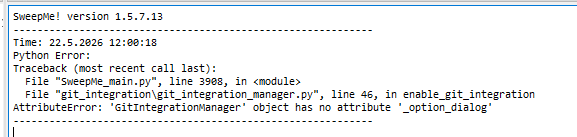
In disconnect, there is just a “pass” in the try-except-finally block. Have a look what the real error is and also check the try-except block in the beginning why there is an Attribute error.
Maybe even remove the try-except handling to always get a clear exception when something does not work as expected. This could help open and close the spectrometer object in a clean way which might also a possible way to resolve your problem.
To really figure out the cause of the problem, professional support is probably needed to do some debug sessions with you. Let us know via contact@sweep-me.net if this an option for you.
Thank you for the quick reply. I will try to get the Error messages with a little editing of the driver.
As I need to do some other troubleshooting regarding the spectrometer, which might result in using a slightly different one, I would get back to you when I’m sure how the setup will look like. Then it would be best to get professional support.