NetworkAnalyzer init error?

Loading this simple setting in latest SweepMe!/modules/drivers, I get 4 times this an error in initialisation. Surprisingly the error is 4x the same in the ENA507x driver. Maybe it an old message that is not cleared?
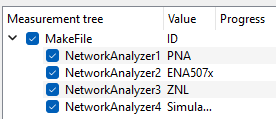
------------------------------------------------------------

Best regards, Remco


Time: 21.1.2026 08:25:00

Message: Error in driver ‘NetworkAnalyzer-Keysight_E507x’ in update_gui_parameters_with_fallback

Python Error:

Traceback (most recent call last):

File “MeasClasses.py”, line 2022, in _get_device_properties

File “pysweepme\EmptyDeviceClass.py”, line 342, in update_gui_parameters_with_fallback

File “C:\ProgramData\SweepMe!\Devices\DC_182_929_NetworkAnalyzer-Keysight_E507x\NetworkAnalyzer-Keysight_E507x\main.py”, line 106, in get_GUIparameter

self.f_start = float(parameter[“FrequencyStart”])

ValueError: could not convert string to float: ‘’

------------------------------------------------------------
------------------------------------------------------------

Time: 21.1.2026 08:25:01

Message: Error in driver ‘NetworkAnalyzer-Keysight_E507x’ in update_gui_parameters_with_fallback

Python Error:

Traceback (most recent call last):

File “MeasClasses.py”, line 2022, in _get_device_properties

File “pysweepme\EmptyDeviceClass.py”, line 342, in update_gui_parameters_with_fallback

File “C:\ProgramData\SweepMe!\Devices\DC_182_929_NetworkAnalyzer-Keysight_E507x\NetworkAnalyzer-Keysight_E507x\main.py”, line 106, in get_GUIparameter

self.f_start = float(parameter[“FrequencyStart”])

ValueError: could not convert string to float: ‘’

------------------------------------------------------------

------------------------------------------------------------

Time: 21.1.2026 08:25:01

Message: Error in driver ‘NetworkAnalyzer-Keysight_E507x’ in update_gui_parameters_with_fallback

Python Error:

Traceback (most recent call last):

File “MeasClasses.py”, line 2022, in _get_device_properties

File “pysweepme\EmptyDeviceClass.py”, line 342, in update_gui_parameters_with_fallback

File “C:\ProgramData\SweepMe!\Devices\DC_182_929_NetworkAnalyzer-Keysight_E507x\NetworkAnalyzer-Keysight_E507x\main.py”, line 106, in get_GUIparameter

self.f_start = float(parameter[“FrequencyStart”])

ValueError: could not convert string to float: ‘’

------------------------------------------------------------

------------------------------------------------------------

Time: 21.1.2026 08:25:02

Message: Error in driver ‘NetworkAnalyzer-Keysight_E507x’ in update_gui_parameters_with_fallback

Python Error:

Traceback (most recent call last):

File “MeasClasses.py”, line 2022, in _get_device_properties

File “pysweepme\EmptyDeviceClass.py”, line 342, in update_gui_parameters_with_fallback

File “C:\ProgramData\SweepMe!\Devices\DC_182_929_NetworkAnalyzer-Keysight_E507x\NetworkAnalyzer-Keysight_E507x\main.py”, line 106, in get_GUIparameter

self.f_start = float(parameter[“FrequencyStart”])

ValueError: could not convert string to float: ‘’

------------------------------------------------------------

1 Like

Hi Remco,
thanks for joining the forum!

Seeing such an error from the get_GUIparameter function multiple times is related to changes in the SweepMe! 1.5.7 where we now support dynamic GUI parameters. This means that a driver can re-create the UI fields depending on the selection in other UI fields.
This is particular important for drivers with a Parameter box where the driver can define own keys and fields, but also modules without a Parameter box can basically refill dropboxes depending on the selection in other dropdown boxed for example.

As a consequence, SweepMe! is now updating the information from get_GUIparameter multiple times.

A good practice is therefore to write code in get_GUIparameter that cannot throw an error. The float-evaluation of the parameter “FrequencyStart” however already fails.

One reason why the parameter is unknown could be the use of the parameter syntax where a parameter is not known yet.

In your case it looks like that the field corresponding to the Frequency start is just empty and python can create a float from an empty string.

Can you check whether the field is emtpy?

There are two solutions:
We can check whether we can inform the user better about missing inputs and the driver could be changed such that the evaluation to float is done in “initialize” or “configure” so that such an early error where the user is just about to enter a number does not lead unneccessary error messages.

Even though there are these 4 error messages, the driver and the measurement work after you have typed in a start frequency.

Thanks for reporting the issue and let us know when there is still an issue with the measurement.

Best, Axel

Hi Axel,

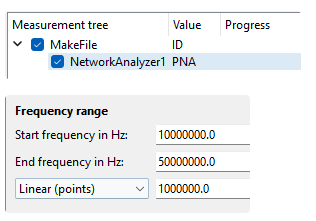
I tried to make a simple example from scratch in the sequencer all with defaults parameters.

I hope you can reproduce this behavior.

When I load it I get this error message:

------------------------------------------------------------

Time: 21.1.2026 11:09:29

Message: Error in driver ‘NetworkAnalyzer-Keysight_E507x’ in update_gui_parameters_with_fallback

Python Error:

Traceback (most recent call last):

File “MeasClasses.py”, line 2022, in _get_device_properties

File “pysweepme\EmptyDeviceClass.py”, line 342, in update_gui_parameters_with_fallback

File “C:\ProgramData\SweepMe!\Devices\DC_182_929_NetworkAnalyzer-Keysight_E507x\NetworkAnalyzer-Keysight_E507x\main.py”, line 106, in get_GUIparameter

self.f_start = float(parameter[“FrequencyStart”])

ValueError: could not convert string to float: ‘’

------------------------------------------------------------

Note that NetworkAnalyzer-Keysight_E507x is even not in the sequencer, so I really wonder why it is called and I get this error…

I forgot to mention, but the start/stop frequency fields are properly filled with the initial values of the driver.

So I don’t understand what goes wrong in reading those parameter fields. What can I do to avoid these errors?

Best regards, Remco

1 Like

Thanks for pointing out the issue with the E507x that is actually not in use. Now, it is obvious that something does not work as expected.

I forward the problem to my colleague and we will come back to you.

We have “trouble” to reproduce the problem.

Can you do some tests for us?

  • Can you restart SweepMe! and load your setting with only the PNA? Does the problem still exist. The standard setting that is loaded at the beginning should be the one with only the PNA or without any NetworkAnalyzer module.

  • Can you go to the Version manager, right-click the E507x driver in the left list and deactivate the driver. Is the error still shown or does the issue now show up for the next driver in the list. It might be related to the fact that the NetworkAnalyzer opens first with the first driver in the list which is the E507x. When loading your setting further, the selected driver is then replaced with your selection being the PNA.

For testing we have used:

  • SweepMe! 1.5.7.11
  • Network Analyzer module 2025-06-30
  • E507x driver 2022-03-22
  • PNA driver 2021-05-18

Let’s see what we can figure out. Probably some state is not reset correclty.

The measurent with the PNA should still run as expected even though the 4 error messages are shown at the beginning?

Hi Axel,

I observed the issue on the 2 computers I tried, so I thought it would be universal :wink:

Anyway, I did the 2 tests you asked for:

  1. after restart with only PNA I still get the error about E507x as reported before
  2. after deactivating the E507x I get the same error, but now from PNA indeed
  3. if I deactivate PNA as well, I can load the single-VNA setting without errors for both ZNL & SimulatedDriver!
  4. reactivating PNA or E507x reintroduces the error

I will be in the lab tomorrow to run some tests, just try to start with a clean debug window before running any tests…But I will try a measurement anyhow.

Thanks for all the fast and helpful feedback!

Best regards, Remco

PS: I use the same versions as you. I also had a 2022-02-15 version for the PNA driver installed, but that has been withdrawn? Anyway, it showed the same issue.

1 Like

Hi Remco,
thanks a lot for testing and also running it at a second PC.
We think your measurement should run as usual, so that you can continue and the problem should be merely about some error messages when loading the module and initializing it the first time.

If there are also problems with the measurement just let us know.

Version 2022-02-15 still exists on our server, but in state ‘testing’. I guess it is one of the versions where we did modifications, but the version was never fully released. Sometimes this can happen when we wait for feedback.

You should be able to see this version after login.
If you give us a positive sign we can release it finally as live version, and I will make a check to see the current state of the driver, too.

Best, Axel

Hi Remco,

based on the behavior you describe, this looks very much like a transient loading issue during the first load of the module/driver. The messages typically indicate that the driver attempts to read GUI parameters before the module has finished fully populating them (though I cannot explain why that happens on your setups). In such cases, the temporary empty values can trigger messages in the debug log, but they usually do not affect the actual measurement workflow once the initialization has completed.

At this point, I don’t see an indication that the measurement itself would be impaired. The driver initializes correctly after these initial attempts and uses the proper configuration during the measurement.

Do you by any chance have custom drivers for the Network Analyzer module on that system? Drivers that don’t define a FrequencyStart could theoretically explain why these fields momentarily appear empty during startup. However, it wouldn’t explain all of the symptoms you describe. I’m afraid the effort required to help us reproduce and pinpoint the exact cause might not be justified by the limited benefit, especially since everything suggests the measurement is functioning correctly.

If you notice any irregularities in the actual measurement itself, feel free to report back, but for now this looks harmless.

Best regards,
Felix

1 Like

Hi Felix and Axel,

Thanks for looking into this. I will look into a possible correlation with custom drivers.

I did limited testing on the setup yesterday and I can confirm that NWA indeed functions properly.

So I agree on your assesment that these errror messages are not nice but harmless and I can still measure.

Best regards, Remco

1 Like