Keithley 4200SCS Remote Control

Hi all,

I’m working on controlling Keithley 4200SCS remotely using SweepMe (version 1.5.7) via Ethernet, and I have a few questions that I would appreciate your help with:

  1. Using the PMU in SweepMe
    I have configured the PMU parameters correctly and set the channel to PMU-CH1, but the measurement results always show 0. Could you please advise if there are additional settings or steps needed to enable proper PMU operation within SweepMe?

  2. Running Python Scripts in SweepMe
    I tried running the example script provided by your team:
    https://github.com/SweepMe/pylptlib-4200SCS/blob/main/examples/SMU_example.pyHowever, after running it, I didn’t see any output in the console — nothing appeared from the print statements. Could you clarify how Python output is handled in SweepMe, or if additional configuration is needed to display script results?

  3. Startup Message “K4200Error: System configuration starting”
    I also notice that this message appears after the first run every time:

    pylptlib.lpt.K4200Error: System configuration starting


    Is this normal, or does it indicate a configuration or communication issue?

Thank you very much for support.

Best,

Daniel

1 Like

Hi Daniel,

thanks a lot for using the forum.

The PMU mode of the Keithley 4200-SCS should allow you to create pulsed IV curves where one pulse is sent for each requested voltage.

Regarding question 1:
Could you send your setting or a screenshot of the SMU module? You can also go to the sequencer, right-click the SMU module and use copy. Then paste the text here in the forum as a code snippet. It is a json string that contains all information about the configuration of the SMU module.

I guess you already installed the LPTlib server application on the Keithley 4200-SCS and configured the config file to run at the IP address of your parameter analyzer? If not you can follow the steps as listed on the instrument driver webpage:
https://sweep-me.net/device/82/Keithley_4200-SCS

I went through the code of the driver that you can also see here
https://github.com/SweepMe/instrument-drivers/blob/main/src/SMU-Keithley_4200-SCS/main.py
and saw that you need to enable pulse mode in the UI of the SMU module. Then configure the pulse properties. Use the Sweep editor to define voltage for a voltage sweep.

Regarding question 2:
You can run the SMU_example.py in your own python environment, independent from SweepMe!. The example shows how to use the open-source library pylptlib that we put on GitHub. I guess you tried to run the script in the “Python Script Tool” that can be found menu “Tools” in SweepMe!. It should basically also work but might not work in the current version of the script. So far the SMU_example.py is designed to work as a python script running on the 4200-SCS because it looks there for the lptlib.dll. If you like to run the script via an external computer, you need to use a Proxy as given here
https://github.com/SweepMe/pylptlib-4200SCS/blob/main/src/tcp_client/ProxyClass.py
and use the option 2 in SMU_example.py from line 8 to 11.

Regarding question 3:
Does this message appear in SweepMe! or in the console of the LPTlib Server tool running on the 4200-SCS? I cannot tell you immediately what the problem is but there might be an issue. Basically, this is an error message from the lptlib.dll that we use to control the parameter analyzer. You can thus also check the documentation of the Keithley LPT library for the 4200-SCS.
https://www.tek.com/en/manual/parametric-analyzer/model-4200a-scs-lpt-library-programming-4200a-scs-parameter-analyzer

While we try to make the automaton of instruments as much as possible plug&play, the control of the 4200-SCS via SweepMe! or own python scripts remains a bit cumbersome as one needs to correctly set up our LPTlib server tool and configure SweepMe! or your python script.

If you like to control the PMU using arbitrary waveforms and pulse segments, it is not supported yet as discussed in this issue:

So far, we only support PMU operation for pulsed IV curves where a single pulse is sent for each voltage of the IV curve.

Here, we are open to extend the range of supported options or help you with configuring everything using our professional services. If needed, please write to:
contact@sweep-me.net

Let us know if you figure something out or have a follow-up question.

Thanks and best
Axel

Hi Axel,

Thank you for the reply.

Question 1:

Here is my setting of the SMU:

{
"child_items": [
{
"child_items": [ ],
"is_checked": true,
"is_expanded": true,
"module_details": {
"module_type": "SMU",
"Label": "SMU1",
"value": "",
"Device": "SMU-Keithley_4200-SCS",
"Channel": "PMU1 - CH1",
"Port": "LPTlib via 192.168.X.XXX",
"SweepValue": "SweepEditor",
"SweepMode": "Voltage in V",
"RouteOut": "Rear",
"4wire": false,
"Compliance": "0.0001",
"SkipCompliance": false,
"Speed": "Medium",
"Range": "Auto",
"RangeVoltage": "",
"Average": "1",
"Configuration": "",
"PostProcessingResistance": false,
"PostProcessingConductance": false,
"PostProcessingPower": false,
"ShowPulse": true,
"CheckPulse": true,
"PulseCount": "1",
"PulseOffLevel": "0.0",
"PulseOnTime": "4e-03",
"PulseOffTime": "200e-3",
"PulsePeriod": "9e-03",
"PulseDelay": "1e-05",
"PulseMeasStart": 5,
"PulseMeasTime": 90,
"PulseRiseTime": "2e-05",
"PulseFallTime": "2e-03",
"PulseImpedance": "1000000.0",
"SweepEditor": {
"sweeps": [
{
"loop": "1",
"start": "0.0",
"end": "8.0",
"step_points": "7.0",
"scaling": "Points (lin.)",
"hold": "0.0"
}
]
},
"ListSweepCheck": false,
"ListSweepType": "Sweep",
"ListSweepStart": "0.0",
"ListSweepEnd": "1.0",
"ListSweepStepPointsType": "Step width:",
"ListSweepStepPointsValue": "0.1",
"ListSweepDual": false,
"ListSweepCustomValues": "",
"ListSweepHoldtime": "0.1",
"ListSweepDelaytime": "0.0",
"Comment": ""
}
}
],
"data_type": "Sequencer",
"version": "v1"
}

I can hear some sound that PMU is working, but the data remains all 0 in SweepMe.

Question 2:

I also tried to run the SMU_example.py in Spyder, but there is always an error message:

RuntimeError Traceback (most recent call last)
File ~\documents\sweepme!\tools\pythonscripts\sweepme code\smu_test.py:13
10 lpt = Proxy(tcp_ip, 8888, “lpt”)
11 param = Proxy(tcp_ip, 8888, “param”)
—> 13 lpt.initialize()
14 lpt.tstsel(1)
15 lpt.devint()

File ~\Documents\SweepMe!\Tools\PythonScripts\SweepMe Code\ProxyClass.py:131, in Proxy.getattr(self, function)
126 command_json = {
127 “class”: self._target_class,
128 “attribute”: function
129 }
130 command = json.dumps(command_json)
→ 131 result = self._send_to_server(command)
132 result_json = self.unpack_result(result)
133 if result_json[“return”][“type”] == “callable”:

File ~\Documents\SweepMe!\Tools\PythonScripts\SweepMe Code\ProxyClass.py:82, in Proxy._send_to_server(self, command)
81 def _send_to_server(self, command: str) → str:
—> 82 result = self.loop.run_until_complete(self._async_send_to_server(command))
83 return result

File ~\AppData\Local\miniconda3\envs\myenv\lib\asyncio\base_events.py:623, in BaseEventLoop.run_until_complete(self, future)
612 “”“Run until the Future is done.
613
614 If the argument is a coroutine, it is wrapped in a Task.
(…)
620 Return the Future’s result, or raise its exception.
621 “””
622 self._check_closed()
→ 623 self._check_running()
625 new_task = not futures.isfuture(future)
626 future = tasks.ensure_future(future, loop=self)

File ~\AppData\Local\miniconda3\envs\myenv\lib\asyncio\base_events.py:585, in BaseEventLoop._check_running(self)
583 raise RuntimeError(‘This event loop is already running’)
584 if events._get_running_loop() is not None:
→ 585 raise RuntimeError(
586 ‘Cannot run the event loop while another loop is running’)

RuntimeError: Cannot run the event loop while another loop is running

Question 3:

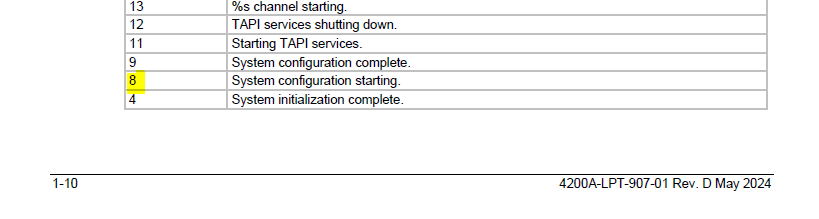
This message appears in the console of the LPTlib Server on 4200-SCS. It should be a step called “System Configuration Complete” according to the error code.

Thanks and best,

Daniel
1 Like

Hi Daniel,

we will have a further look at it.

Just one question: Did you already manage to take a simple IV curve with the SMU units of the Keithley 4200-SCS parameter analyzer? I mean did you get some results at all so far?

This would prove that a general connection with the device works and we may have to fix a bug with using the PMU or document the correct configuration.

Thanks and best
Axel

Hi Daniel,

Regarding question 1:
I modified a bit your JSON string in your message to put it into a code box from where one can easily copy it.

I can now easily copy it into my SweepMe! and see your configuration. Thanks for sending it!

It looks well configured to me. The pulse mode is activated and the used values for pulse width, period, rise/fall times make sense to me.

Next thing you can check is which version of the 4200-SCS driver you are using and whether the newest one is already used. You can install multiple versions of a driver locally on your computer. Just remember the one that you used so far. Then, test a newer one switch back if there are any problems.

Regarding question 2:
We will check the code and come back to you here in the forum.

Regarding question 3:
The error message can be found in the LPT library documentation as linked above.


However, I did not find any additional information about the meaning

It could be that this message is just an info, but to make sure I recommend to contact Tektronix/Keithley support and ask about the meaning of this message.

Thanks and best
Axel

Hi Axel,

The configuration with SMU works well, I can see the results simply in the figure. However, the PMU only shows 0-line in IV. I’ll check the version.

Thanks and best,

Daniel

1 Like

Hi Daniel,

good to know a standard SMU measurement is already working.

Regarding question 2:
The error you see is probably related to the use of Spyder as IDE who has an own event loop running that conflicts with the event loop of the client-server communication that we use.

When using Spyder, you can try to use the two lines above at the beginning:

import nest_asyncio
nest_asyncio.apply()

which allow for nested event loops.

Otherwise, I recommend to not use Spyder but any other IDE to start the script with a pure Python environment.