Form Module Update: Labels, Editing, and Configuration
We would like to share an update to the Form module, available starting with version 2025-10-20 and included in the latest SweepMe! release.
The Form module allows you to create a centralized form for entering all important parameters needed to perform a measurement. This ensures that users can adjust settings in one place rather than modifying parameters across multiple modules. Additionally, parameters from the form can be read during a measurement and passed to instruments.
What’s New?
-
Labels for Better Structure
-
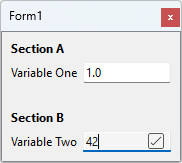
You can now add labels to organize your form into sections, as shown in the screenshot below.
-
Labels can also be left empty to create spacing between fields for better readability.
-
-
Improved Editing Workflow
- Changes in editable text-based fields (e.g., String, Float) are no longer applied instantaneously, but only after the user confirms the changes.
- To confirm changes, clicking the checkmark at the end of the field, press Enter, or click somewhere outside the field.
- To cancel changes, press Esc.
- Example: In the screenshot above, Variable Two is currently being edited and not yet confirmed, while Variable One is already set.
-
Enhanced Right-Click Menu
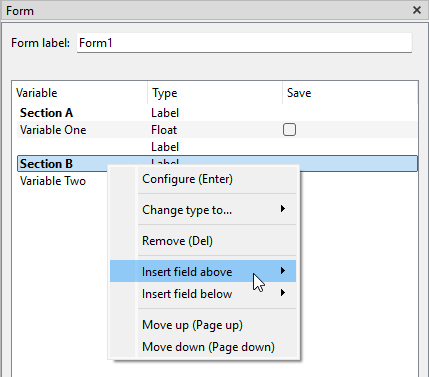
- In addition to existing actions (delete, move up/down), you can now directly insert new fields above or below the selected item.
- This speeds up adding new fields in the middle or at the top and removes the need to move new fields through all others.
This update makes it easier to structure forms, manage parameters, and maintain clarity during measurements.
Feel free to share your feedback or questions!