Hi. I am using two 2400 SMU for both gate and source-drain electrodes.. I would like to measure Ids at a fixed Vds while a train of square Vgs is applied. I also want to apply sinusoildal waveforms at both Vgs and Vds. Is it possible using seep me? How can I run these two measurements? Thanks.
Hi Natan,
you can do this in SweepMe! by setting one voltage after another and reading the currents after each point. The Keithley 2400 also offers a List sweep mode, but here you do not have the flexibility to apply arbitrary values to my knowledge.
Here is how it can look like
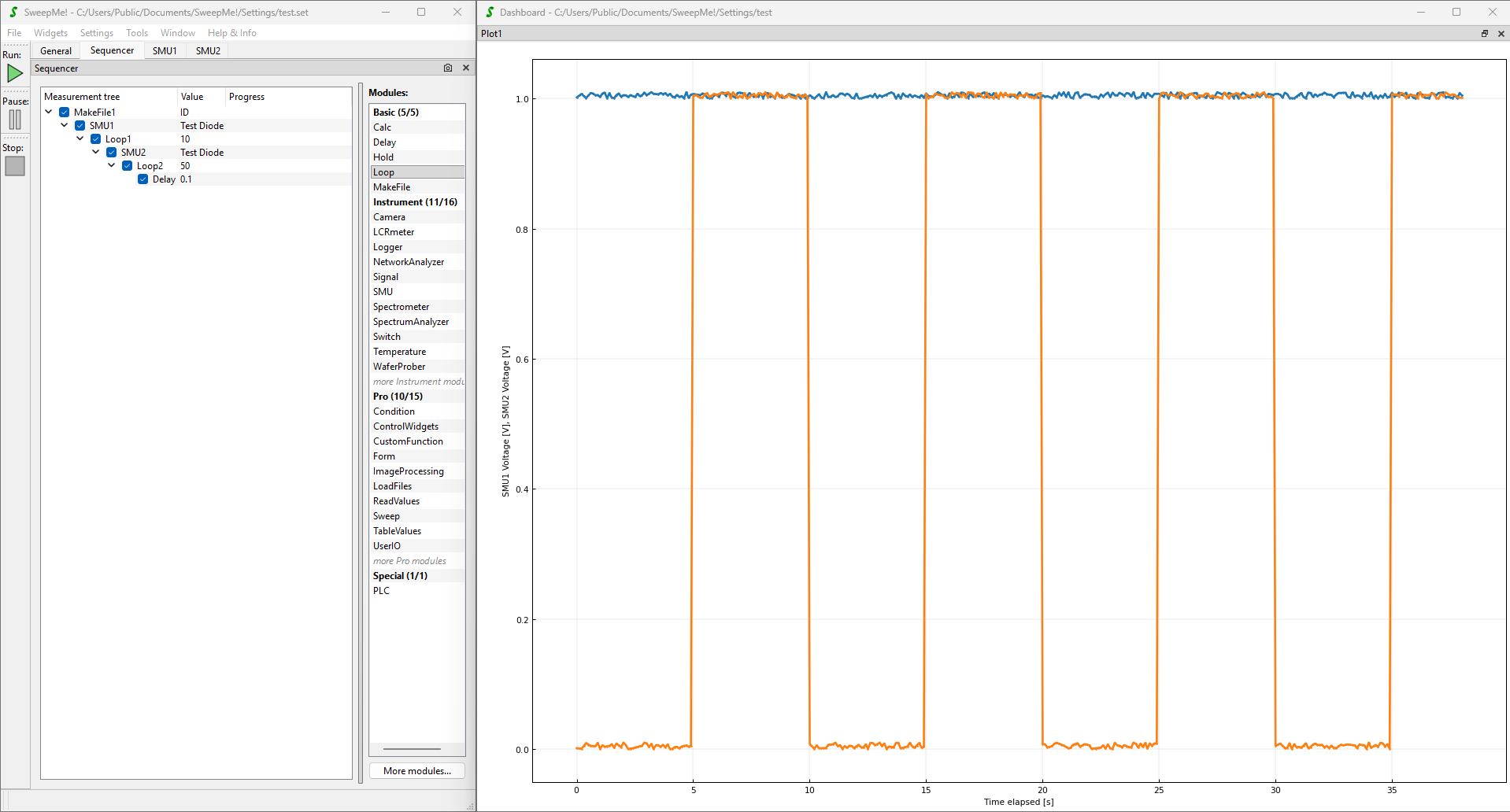
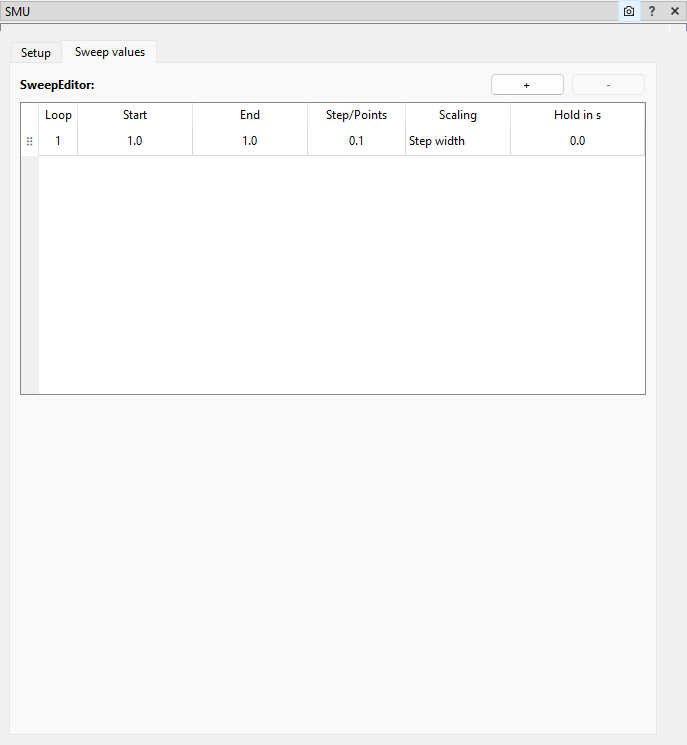
SMU1 is set to a constant voltage, e.g. 1.0 V for the drain:
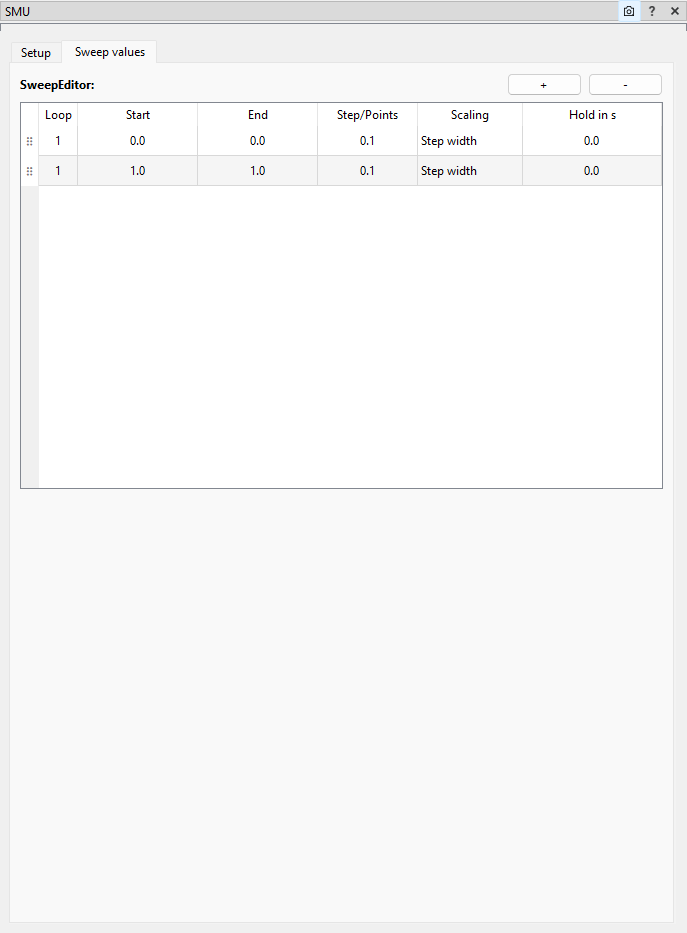
SMU2 is alternating between two values to generate your square:
To repeat each state multiple times, I added Loop2 with 50 repetitions. Further, I added a Delay module to separate the measurement points by 0.1 seconds and making sure points keep equidistant even if the communication with the instrument varies.
The Loop1 module is used to repeat the entire cycle multiple times.
It would be also possible to repeat everything with changing drain and gate voltage by creating a drain voltage sweep.
You can copy and paste the below string into the sequencer to test it immediately
{
  "child_items": [
    {
      "child_items": [
        {
          "child_items": [
            {
              "child_items": [
                {
                  "child_items": [
                    {
                      "child_items": [
                        {
                          "child_items": [],
                          "is_checked": true,
                          "is_expanded": true,
                          "module_details": {
                            "module_type": "Delay",
                            "Label": "Delay",
                            "value": "0.1",
                            "Comment": ""
                          }
                        }
                      ],
                      "is_checked": true,
                      "is_expanded": true,
                      "module_details": {
                        "module_type": "Loop",
                        "Label": "Loop2",
                        "value": "50",
                        "Repetitions": "50",
                        "UseReduction": false,
                        "MaxPoints": 10000,
                        "Reduction": "Quadratic",
                        "KeepLastPoints": 10,
                        "Comment": ""
                      }
                    }
                  ],
                  "is_checked": true,
                  "is_expanded": true,
                  "module_details": {
                    "module_type": "SMU",
                    "Label": "SMU2",
                    "value": "",
                    "Device": "SMU-Simulation_Diode",
                    "Channel": "",
                    "Port": "",
                    "SweepValue": "SweepEditor",
                    "SweepMode": "Voltage in V",
                    "RouteOut": "Front",
                    "4wire": false,
                    "Compliance": "0.001",
                    "SkipCompliance": false,
                    "Speed": "Fast",
                    "Range": "Auto",
                    "RangeVoltage": "",
                    "Average": "1",
                    "Parameters": {},
                    "Configuration": "",
                    "PostProcessingResistance": false,
                    "PostProcessingConductance": false,
                    "PostProcessingPower": false,
                    "ShowPulse": false,
                    "CheckPulse": false,
                    "PulseCount": "1",
                    "PulseOffLevel": "0",
                    "PulseOnTime": "200e-6",
                    "PulseOffTime": "200e-3",
                    "PulsePeriod": "1e-3",
                    "PulseDelay": "0.0",
                    "PulseMeasStart": 50,
                    "PulseMeasTime": 30,
                    "PulseRiseTime": "100e-9",
                    "PulseFallTime": "100e-9",
                    "PulseImpedance": "200e-3",
                    "SweepEditor": {
                      "sweeps": [
                        {
                          "loop": "1",
                          "start": "0.0",
                          "end": "0.0",
                          "step_points": "0.1",
                          "scaling": "Step width",
                          "hold": "0.0"
                        },
                        {
                          "loop": "1",
                          "start": "1.0",
                          "end": "1.0",
                          "step_points": "0.1",
                          "scaling": "Step width",
                          "hold": "0.0"
                        }
                      ]
                    },
                    "ListSweepCheck": false,
                    "ListSweepType": "Sweep",
                    "ListSweepStart": "0.0",
                    "ListSweepEnd": "1.0",
                    "ListSweepStepPointsType": "Step width:",
                    "ListSweepStepPointsValue": "0.1",
                    "ListSweepDual": false,
                    "ListSweepCustomValues": "",
                    "ListSweepHoldtime": "",
                    "ListSweepDelaytime": "0.0",
                    "Comment": ""
                  }
                }
              ],
              "is_checked": true,
              "is_expanded": true,
              "module_details": {
                "module_type": "Loop",
                "Label": "Loop1",
                "value": "10",
                "Repetitions": "10",
                "UseReduction": false,
                "MaxPoints": 10000,
                "Reduction": "Quadratic",
                "KeepLastPoints": 10,
                "Comment": ""
              }
            }
          ],
          "is_checked": true,
          "is_expanded": true,
          "module_details": {
            "module_type": "SMU",
            "Label": "SMU1",
            "value": "",
            "Device": "SMU-Simulation_Diode",
            "Channel": "",
            "Port": "",
            "SweepValue": "SweepEditor",
            "SweepMode": "Voltage in V",
            "RouteOut": "Front",
            "4wire": false,
            "Compliance": "0.001",
            "SkipCompliance": false,
            "Speed": "Fast",
            "Range": "Auto",
            "RangeVoltage": "",
            "Average": "1",
            "Parameters": {},
            "Configuration": "",
            "PostProcessingResistance": false,
            "PostProcessingConductance": false,
            "PostProcessingPower": false,
            "ShowPulse": false,
            "CheckPulse": false,
            "PulseCount": "1",
            "PulseOffLevel": "0",
            "PulseOnTime": "200e-6",
            "PulseOffTime": "200e-3",
            "PulsePeriod": "1e-3",
            "PulseDelay": "0.0",
            "PulseMeasStart": 50,
            "PulseMeasTime": 30,
            "PulseRiseTime": "100e-9",
            "PulseFallTime": "100e-9",
            "PulseImpedance": "200e-3",
            "SweepEditor": {
              "sweeps": [
                {
                  "loop": "1",
                  "start": "1.0",
                  "end": "1.0",
                  "step_points": "0.1",
                  "scaling": "Step width",
                  "hold": "0.0"
                }
              ]
            },
            "ListSweepCheck": false,
            "ListSweepType": "Sweep",
            "ListSweepStart": "0.0",
            "ListSweepEnd": "1.0",
            "ListSweepStepPointsType": "Step width:",
            "ListSweepStepPointsValue": "0.1",
            "ListSweepDual": false,
            "ListSweepCustomValues": "",
            "ListSweepHoldtime": "",
            "ListSweepDelaytime": "0.0",
            "Comment": ""
          }
        }
      ],
      "is_checked": true,
      "is_expanded": true,
      "module_details": {
        "module_type": "MakeFile",
        "Label": "MakeFile1",
        "value": "ID",
        "FileID": "ID",
        "ShowAdvancedOptions": false,
        "BranchIndex": true,
        "FileIndex": true,
        "ModuleLabels": true,
        "Comment": ""
      }
    }
  ],
  "data_type": "Sequencer",
  "version": "v1",
  "sweepme_version": "1.5.8.2"
}
The example above used the simulated diode driver. This way you can test the sequencer without any instrument connected. Just change this to your Keithley 2400 driver.
Thanks and best,
Axel
To create sinusoidal voltages, you can use the following sequencer
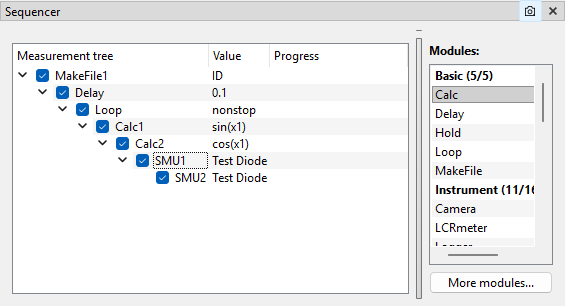
that will lead to this result:
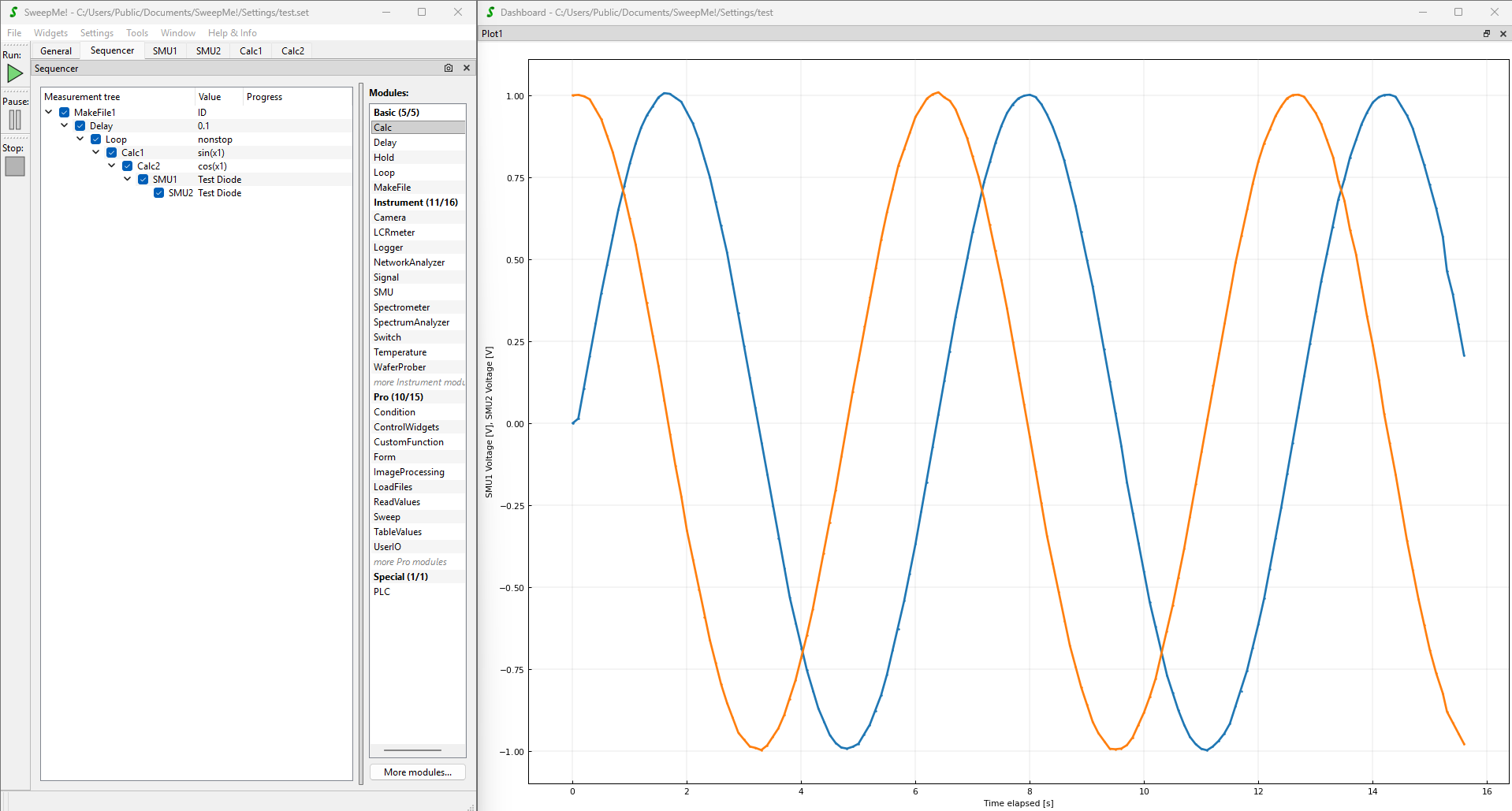
A Delay module with 0.1 seconds and a Loop module in nonstop mode create some kind of event loop that keeps the measurement forever.
The modules Calc1 and Calc2 are used to create set values using sin(x1) and cos(x1) where x1 is defined in the Calc modules to be the elapsed time:
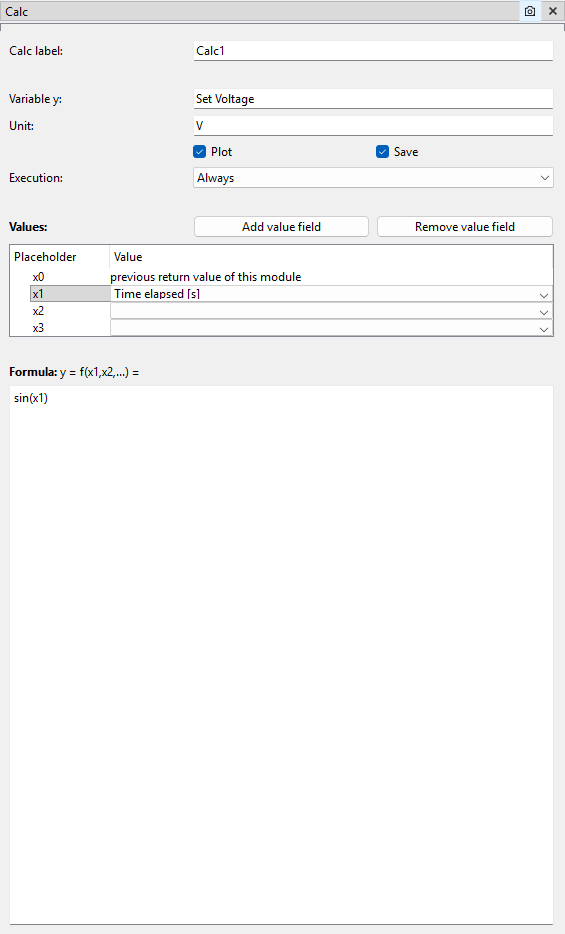
The trick is now to handover the Calc values to the SMU modules:
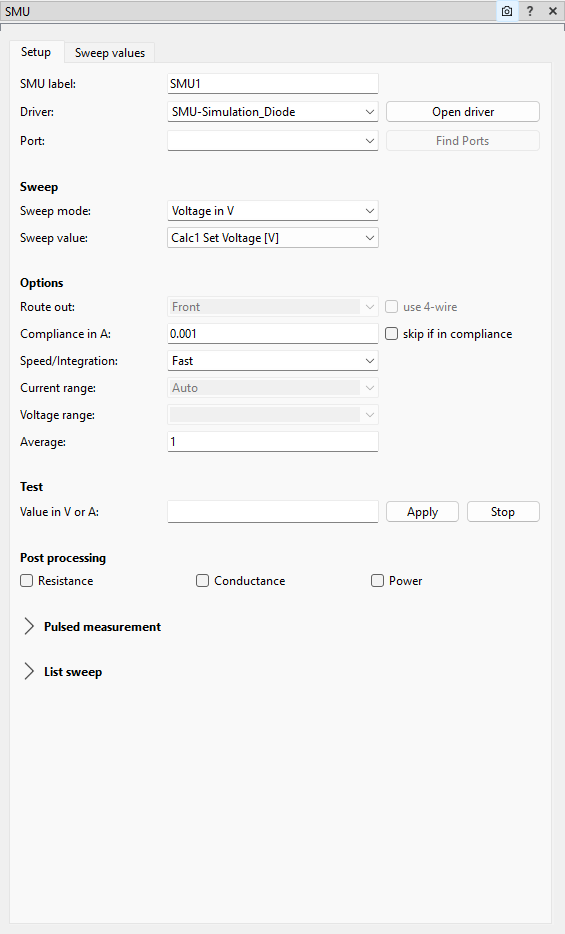
Here, the Sweep value is changed to “Calc1 Set Voltage [V]”. The same I did for SMU2 and Calc2 respectively.
Here you can find again a JSON string that you can directly paste into an empty sequencer:
{
"child_items": [
{
"child_items": [
{
"child_items": [
{
"child_items": [
{
"child_items": [
{
"child_items": [
{
"child_items": [
{
"child_items": [],
"is_checked": true,
"is_expanded": true,
"module_details": {
"module_type": "SMU",
"Label": "SMU2",
"value": "",
"Device": "SMU-Simulation_Diode",
"Channel": "",
"Port": "",
"SweepValue": "Calc2 Set voltage [V]",
"SweepMode": "Voltage in V",
"RouteOut": "Front",
"4wire": false,
"Compliance": "0.001",
"SkipCompliance": false,
"Speed": "Fast",
"Range": "Auto",
"RangeVoltage": "",
"Average": "1",
"Parameters": {},
"Configuration": "",
"PostProcessingResistance": false,
"PostProcessingConductance": false,
"PostProcessingPower": false,
"ShowPulse": false,
"CheckPulse": false,
"PulseCount": "1",
"PulseOffLevel": "0",
"PulseOnTime": "200e-6",
"PulseOffTime": "200e-3",
"PulsePeriod": "1e-3",
"PulseDelay": "0.0",
"PulseMeasStart": 50,
"PulseMeasTime": 30,
"PulseRiseTime": "100e-9",
"PulseFallTime": "100e-9",
"PulseImpedance": "200e-3",
"SweepEditor": {
"sweeps": [
{
"loop": "1",
"start": "0.0",
"end": "0.0",
"step_points": "0.1",
"scaling": "Step width",
"hold": "0.0"
},
{
"loop": "1",
"start": "1.0",
"end": "1.0",
"step_points": "0.1",
"scaling": "Step width",
"hold": "0.0"
}
]
},
"ListSweepCheck": false,
"ListSweepType": "Sweep",
"ListSweepStart": "0.0",
"ListSweepEnd": "1.0",
"ListSweepStepPointsType": "Step width:",
"ListSweepStepPointsValue": "0.1",
"ListSweepDual": false,
"ListSweepCustomValues": "",
"ListSweepHoldtime": "",
"ListSweepDelaytime": "0.0",
"Comment": ""
}
}
],
"is_checked": true,
"is_expanded": true,
"module_details": {
"module_type": "SMU",
"Label": "SMU1",
"value": "",
"Device": "SMU-Simulation_Diode",
"Channel": "",
"Port": "",
"SweepValue": "Calc1 Set Voltage [V]",
"SweepMode": "Voltage in V",
"RouteOut": "Front",
"4wire": false,
"Compliance": "0.001",
"SkipCompliance": false,
"Speed": "Fast",
"Range": "Auto",
"RangeVoltage": "",
"Average": "1",
"Parameters": {},
"Configuration": "",
"PostProcessingResistance": false,
"PostProcessingConductance": false,
"PostProcessingPower": false,
"ShowPulse": false,
"CheckPulse": false,
"PulseCount": "1",
"PulseOffLevel": "0",
"PulseOnTime": "200e-6",
"PulseOffTime": "200e-3",
"PulsePeriod": "1e-3",
"PulseDelay": "0.0",
"PulseMeasStart": 50,
"PulseMeasTime": 30,
"PulseRiseTime": "100e-9",
"PulseFallTime": "100e-9",
"PulseImpedance": "200e-3",
"SweepEditor": {
"sweeps": [
{
"loop": "1",
"start": "1.0",
"end": "1.0",
"step_points": "0.1",
"scaling": "Step width",
"hold": "0.0"
}
]
},
"ListSweepCheck": false,
"ListSweepType": "Sweep",
"ListSweepStart": "0.0",
"ListSweepEnd": "1.0",
"ListSweepStepPointsType": "Step width:",
"ListSweepStepPointsValue": "0.1",
"ListSweepDual": false,
"ListSweepCustomValues": "",
"ListSweepHoldtime": "",
"ListSweepDelaytime": "0.0",
"Comment": ""
}
}
],
"is_checked": true,
"is_expanded": true,
"module_details": {
"module_type": "Calc",
"Label": "Calc2",
"value": "",
"Variable": "Set voltage",
"Unit": "V",
"Function": "cos(x1)",
"Plot": true,
"Save": true,
"Execution": "Always",
"Value1": "Time elapsed [s]",
"Value2": "",
"Value3": "",
"Comment": ""
}
}
],
"is_checked": true,
"is_expanded": true,
"module_details": {
"module_type": "Calc",
"Label": "Calc1",
"value": "",
"Variable": "Set Voltage",
"Unit": "V",
"Function": "sin(x1)",
"Plot": true,
"Save": true,
"Execution": "Always",
"Value1": "Time elapsed [s]",
"Value2": "",
"Value3": "",
"Comment": ""
}
}
],
"is_checked": true,
"is_expanded": true,
"module_details": {
"module_type": "Loop",
"Label": "Loop",
"value": "nonstop",
"Repetitions": "0",
"UseReduction": false,
"MaxPoints": 10000,
"Reduction": "Quadratic",
"KeepLastPoints": 10,
"Comment": ""
}
}
],
"is_checked": true,
"is_expanded": true,
"module_details": {
"module_type": "Delay",
"Label": "Delay",
"value": "0.1",
"Comment": ""
}
}
],
"is_checked": true,
"is_expanded": true,
"module_details": {
"module_type": "MakeFile",
"Label": "MakeFile1",
"value": "ID",
"FileID": "ID",
"ShowAdvancedOptions": false,
"BranchIndex": true,
"FileIndex": true,
"ModuleLabels": true,
"Comment": ""
}
}
],
"data_type": "Sequencer",
"version": "v1",
"sweepme_version": "1.5.8.2"
}
Feel free to play around with the functions in the Calc module to create your desired voltage variation.
More sophisticated things can be done with the CustomFunction module where you can use pure Python in a script file to calculate and return your desired values.
Let me know if this works for you.
Thanks and best
Axel
Hi, Axel. Thank you very much for all the instructions. I will play with both square and sinusoidal measurements. I will let you know how it works. Thanks again.