Condition for activating different branches

Hi,

this is probably an easy-to-solve question: I wanted to activate some measurement branches, depending on the selection that I make in a Form module.

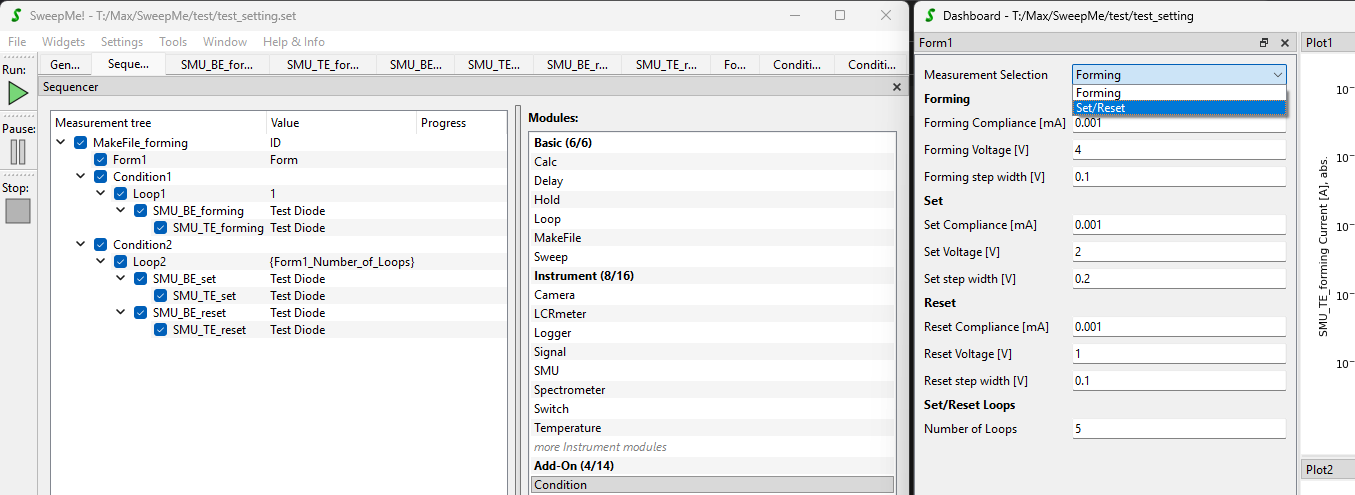
In my Form, I can select “Forming” or “Set/Reset”, which works and it sets the right parameter value.

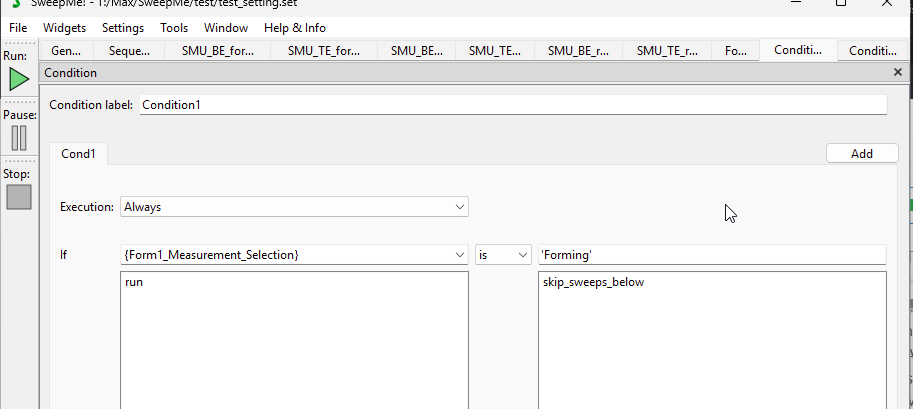
However, in my Condition1 I have set this:

But it doesn’t work, in the Debug window it says:

Debug: 12.11.2025 13:50:31 Run started

Debug: 12.11.2025 13:50:31 Condition → Variable: Forming <class ‘str’> Relation: is Value: Forming <class ‘str’> Result: False

Debug: 12.11.2025 13:50:31 Run finished

What am I missing? Thanks for the help!

Best regards
Benjamin

1 Like

Hi Benjamin,

it could be related to the use of “is” which is preferably to be used when comparing uniquely defined items in Python such as None, True, False.

I made a quick comparison between dog and cat to see the effect: :slight_smile:

>>> "dog" is "cat"
<stdin>:1: SyntaxWarning: "is" with a literal. Did you mean "=="?
False
>>> "dog" == "cat"
False
>>> "dog" is "dog"
<stdin>:1: SyntaxWarning: "is" with a literal. Did you mean "=="?
True
>>> "dog" != "cat"
True

Can you test it with “==” as comparator?

The syntax in Condition module basically follows the Python syntax.

You can get further debug information from the Condition module by right-clicking into the module and activate the Debug flag. Then, further output is presented in the Debug widget as shown in the screenshot in this reply:

Let us know if it works or further help is needed.

Regarding the action that you used: The action “run” is starting a measurement and thus will be omitted here as the run is already running. If you like to do nothing, it means just proceed, then you can keep the field empty.

You can also reverse the comparator by using “!=” to check for a difference and move “skip_sweeps_below” to the “Then” box.

If you like to add empty lines in your Form, this is possible by adding a Label with no text.

Hope this helps!
Best, Axel

Hi Axel,

as I thought, this was easy to solve for you :slight_smile: Thanks a lot, using the “==” and “!=” worked perfectly!

I initially wanted to use the reverse order, and by using “If selection != value then skip branch” this works now as intended.

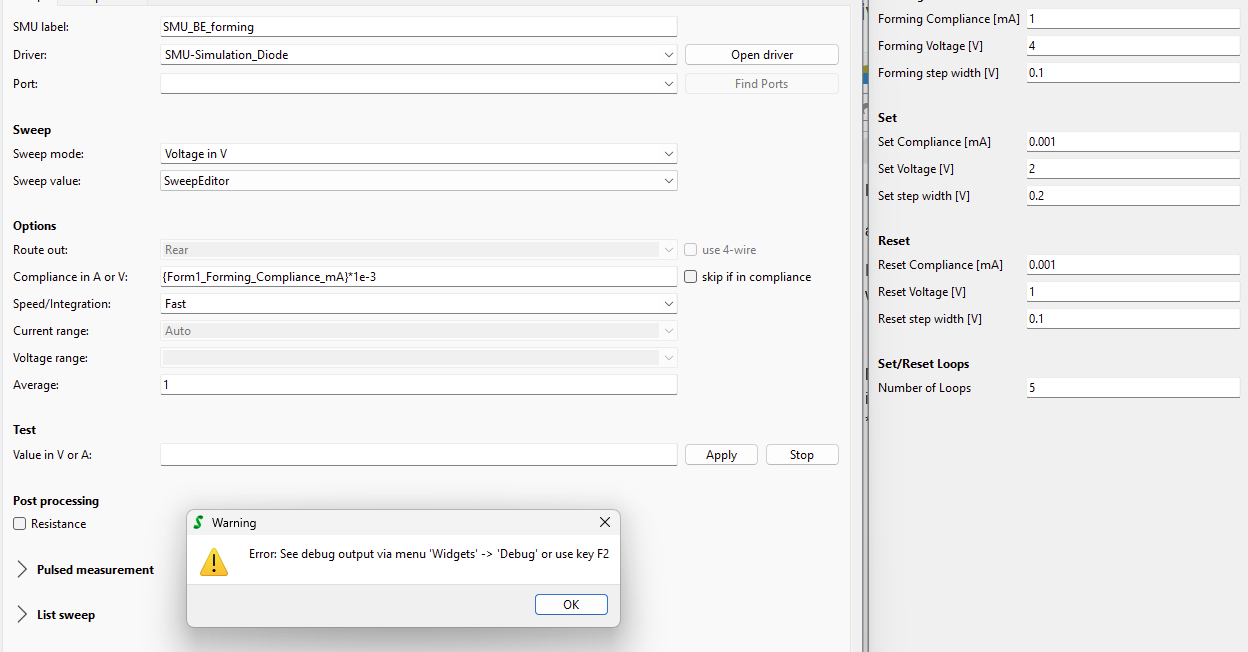
Maybe one additional, unrelated question: When I set the current compliance via the form parameter in mA, and then try to put this in the SMU compliance by using {Form1_Forming_Compliance_mA}*1e-3 (to get it in Ampere), its giving me an error message:

Is this problem related to the Simulation-Diode-SMU? Because I tried it out this morning on a real SMU, and it worked without problems.

Here is the debug code:

Time: 12.11.2025 14:49:51

Message: Error in driver ‘SMU-Simulation_Diode’ in update_gui_parameters_with_fallback

Python Error:

Traceback (most recent call last):

File “MeasClasses.py”, line 1979, in _get_device_properties

File “pysweepme\EmptyDeviceClass.py”, line 300, in update_gui_parameters_with_fallback

File “C:\Users\max\AppData\Local\SweepMe!\SweepMe!_1.5.7\Devices\SMU-Simulation_Diode\main.py”, line 73, in get_GUIparameter

self.protection = float(parameter[“Compliance”])

ValueError: could not convert string to float: ‘1.0*1e-3’

------------------------------------------------------------

------------------------------------------------------------

Debug: 12.11.2025 14:49:51 Run stopped due to error

Best regards
Benjamin
1 Like

Hi Benjamin,

the trick with in-line calculations using the parameter syntax is adding another level of curly brackets like

{{Form1_Forming_Compliance_mA}*1e-3}

Without everyhing in {…}, the parameter will be replace, but the rest will be handed over as is without further evaluation.

I guess you did it correct morning and later forgot to put it again into the curly brackets.
Can you test this?

Thanks for adding your question. It is helpful for all users!

Best, Axel

Thanks again for the quick help, using the additional curly brackets was the solution.

Now that I think about it, when I was testing this on a real SMU, I think I was still using the Calc module to make that conversion from mA to A. I will test it out tomorrow again when I am at the probe station.

Best regards
Benjamin

1 Like

I checked again on the real SMU measurement sequence, and I did it with the calc-module. It only work as you mentioned with the double curly brackets

Another questions regarding the branch activation just popped up from my student:

Is there an easy way to have three selections, with two different measurement branches, and having “Selection 1 → execute measurement branch 1”, “Selection 2 → execute measurement branch 2” and “Selection 3 → execute measurement branch 1 and 2”

I was playing around with different conditions, but I couldnt find a good solution because as I see it, the condition-module doesnt have an OR-functionality, right?

Best regards
Benjamin

1 Like

Hi,

indeed it can become a bit more tricky, but basically it should be possible by using longer parameter syntax expressions in Conditions like

{ {par1} is "Selection1" or {par2} is "Selection2" }

of just

{ {par1} or {par2} }  # if {par1} and {par2} are already boolean 

This will evalaute to True or False and can then be compared in Condition again with True or False.

Can you try this?

For better understanding: SweepMe! checks the content of curly brackets. If it is a known parameter it will be replaced, otherwise the content is interpreted as python code. This runs as long as there are no more curly brackets from inner brackets to outer brackets.

What else ist possible in general?

{ {par1} if {par2} == "dog" else {par3} } 

or

{ int({par1}) + int({par2}) }

The only problem is with longer paramter syntax expressions is that they might get difficult to debug, but so far they are good for quick inline calculations and comparisons without adding an extra Calc or CustomFunction module just for that.

Thanks and best,
Axel

Sorry in advance for my lack of knowledge of these very basic things that I don’t get :wink:

Where exactly do I put that syntax expression? Like this?

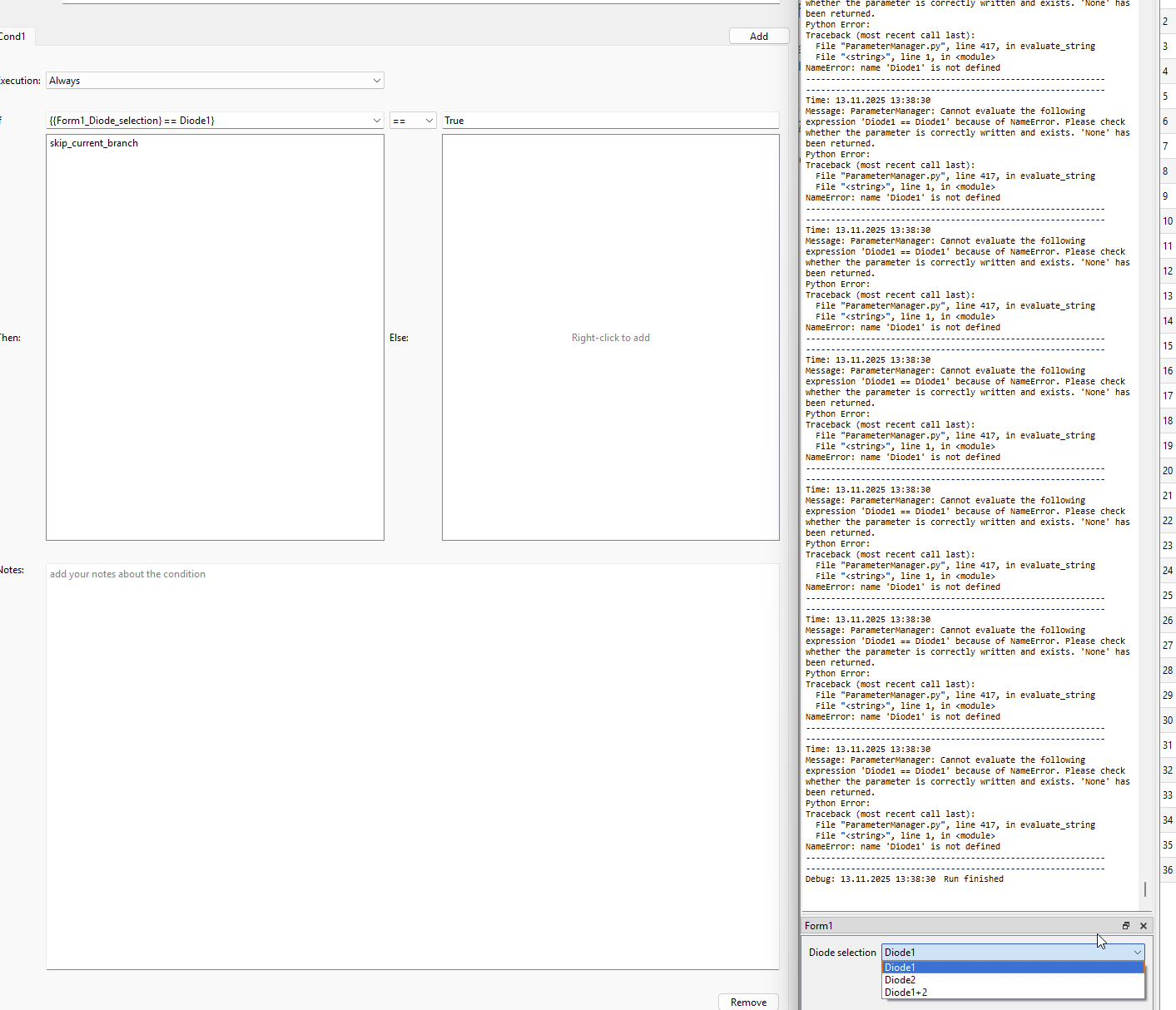
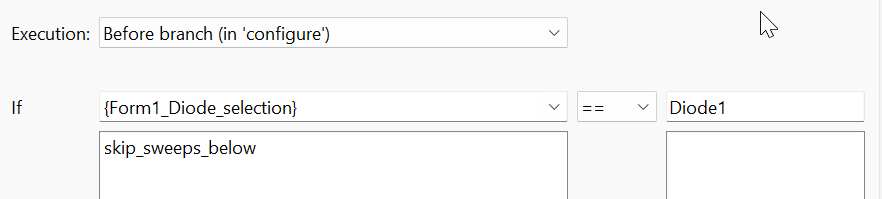
I have these three selections Diode1, Diode2 and Diode1+2, and my parameter from the Form is {Form1_Diode_selection}. And when I put in the syntax in its giving me these error messages as shown in the Debug. I also tried out different variants, like with == or with is"

I probably did some things fundamentally wrong, so sorry for these newbie-questions.

1 Like

Hi Benjamin,

all questions are welcome and I am sure there is another user who has the same problem.

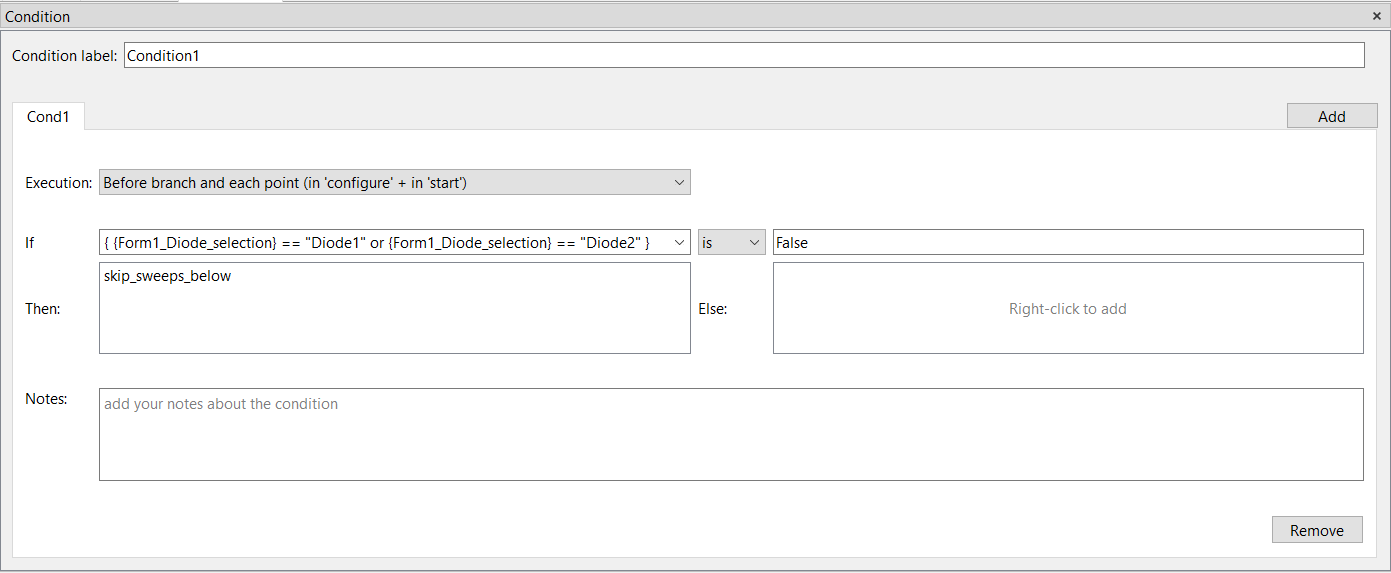
I have not tested it, but here is how one can solve it:

Edit: Not the correct solution, please scroll down to the next answer to find a working solution. Additional quotation marks around the parameter are missing

The “If” field of the Condition module is used to create a boolean that can depend on different selections in your Selection dropdown box, combined by or operator. This complete expression is then compared with the True or False in the second input field.

You might need to adjust a bit the logic until it matched your desired behavior. The options “Diode1” and “Diode” are here used with quotation marks to define them as string during interpretation. Otherwise, python will wonder why the python attributes Diode1 and Diode2 are not defined.

Let me know if you need more help.
Best, Axel

Hi Axel,

thanks for the help. Thats pretty much how I tried it, but it still doesnt work.

My initial test was like this, and that works without problems. If I select Diode1, the SMU measurement is skipped (I just did it like that to see if my condition works properly)

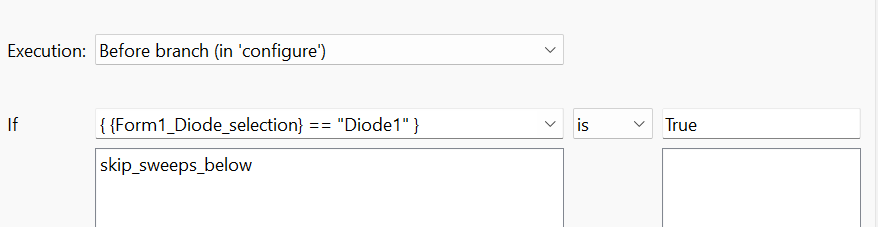
However, when I write it like you suggested, even in the simpler form, it doesnt work:

The error message in the debug window says:

Time: 13.11.2025 18:09:00

Message: ParameterManager: Cannot evaluate the following expression ’ Diode1 == “Diode1” ’ because of NameError. Please check whether the parameter is correctly written and exists. ‘None’ has been returned.

Python Error:

Traceback (most recent call last):

File “ParameterManager.py”, line 417, in evaluate_string

File “”, line 1, in

NameError: name ‘Diode1’ is not defined

I am not really familiar with Python, so to be honest I dont know what that means :wink:

Best regards
Benjamin

1 Like

Hi Benjamin,

right, there is a tricky problem that I forgot about when it is about handling strings.

If you use a string like {Form1_Diode_selection}, it will be replaced with the string but without quotation marks, which is just Diode1. Python now thinks it is an attribute/variable and cannot find it in the memory leading to the NameError as the name of the attribute is nowhere registered yet.

The trick is therefore to add additional quotation marks as well for the parameter as following:

{ "{Form1_Diode_selection}" == "Diode1" }

This will evaluate to

{ "Diode1" == "Diode1" }  # being True

or

{ "Diode2" == "Diode1" }  # being False

So, handling the comparison of strings is tricky.

We could have solved it also by replacing a string parameter directly with quotation marks, but people who would need the string without quotation marks would have then a problem as well. This is for example the case when you like to use string parameter in an editable Dropdown box, where you want to insert a text option (but without quotation marks).

Hope this makes sense and gives some understanding how the replacement works. Let me know if there is still a problem.

Thanks and best
Axel

Perfect, that was the missing thing. Now it works perfectly, thanks so much for the very valuable help!

Best regards
Benjamin

1 Like