Absolute, full-digits values on Y-axis

Hello SweepMe Team.

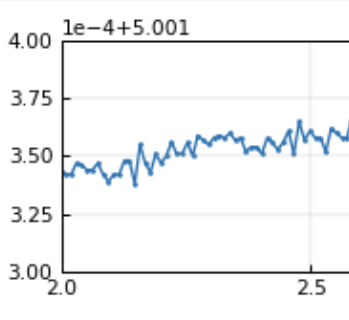
SweepMe changes to a display of partial values on the y-axis whenever the amount of digits to be displayed increases substancially. While this is a mathematically correct representation and displaying the absolute values on the Y-axis might lead to an awkward space requirement left of the Y-axis, it has irritated me since day one. I though that this is only me but now with increasing use, I present the results to others more frequently and I constantly hear the same complaint from the audience.

Would it be possible to offer the option to display absolute values on the axes? Example shows what should be labled 5.001300 to 5.001400 instead.

Thanks,
Christian

1 Like

Hi Christian,

yes, it is not the first time that people get confused when the offset is displayed in the top left corner. Main reason for this handling is basically to keep the number at the left y-axis short in order to keep the distance between the left y-axis and the left figure border constant. If this is not ensured, one can easily observe some annoying “jumping” of the y-axis as distance can vary with the length of the number. So, we thought that this solution is the least awkward solution.

If you like to experiment yourself with different options, we implemented a way to overwrite the matplotlib style. We use the python library matplotlib for plotting and one can put a default.mplstyle file into the public SweepMe! folder Resources\mplstyles

C:\Users\Public\Documents\SweepMe!\Resources\mplstyles

You can find a template of such a file here

https://matplotlib.org/stable/users/explain/customizing.html#the-default-matplotlibrc-file

Just copy the text and save it as default.mplstyle into the above given folder.

Further, you can find the SweepMe! default style in your SweepMe! installation here:
C:\Program Files\SweepMe!\SweepMe!_1.5.7\Widgets\Plot\mplstyles

where you can copy the default.mplstyle file to the public SweepMe! folder “Resources\mplstyles”

You can now uncomment lines by removing the # symbol to activate lines and make changes.
The section with AXES parameters starts from line ~ 344.

Some properties are overwritten by the Plot settings, e.g. line width, marker size etc.

Here is a setting that you can copy and paste into the sequencer to create slightly varying random number with an offset.

{
  "child_items": [
    {
      "child_items": [
        {
          "child_items": [
            {
              "child_items": [
                {
                  "child_items": [],
                  "is_checked": true,
                  "is_expanded": true,
                  "module_details": {
                    "module_type": "Calc",
                    "Label": "Calc1",
                    "value": "",
                    "Variable": "Parameter",
                    "Unit": "a.u.",
                    "Function": "random()/1e5 + 1",
                    "Plot": true,
                    "Save": true,
                    "Execution": "Always",
                    "Value1": "",
                    "Value2": "",
                    "Value3": "",
                    "Comment": ""
                  }
                }
              ],
              "is_checked": true,
              "is_expanded": true,
              "module_details": {
                "module_type": "Hold",
                "Label": "Hold",
                "value": "0.030",
                "Comment": ""
              }
            }
          ],
          "is_checked": true,
          "is_expanded": true,
          "module_details": {
            "module_type": "Loop",
            "Label": "Loop",
            "value": "nonstop",
            "Repetitions": "0",
            "UseReduction": false,
            "MaxPoints": 10000,
            "Reduction": "Quadratic",
            "KeepLastPoints": 10,
            "Comment": ""
          }
        }
      ],
      "is_checked": true,
      "is_expanded": true,
      "module_details": {
        "module_type": "MakeFile",
        "Label": "MakeFile",
        "value": "ID",
        "FileID": "ID",
        "ShowAdvancedOptions": false,
        "BranchIndex": true,
        "FileIndex": true,
        "ModuleLabels": true,
        "Comment": ""
      }
    }
  ],
  "data_type": "Sequencer",
  "version": "v1"
}

There is no need to restart SweepMe! to make changes active, but you need at least to renew the Plot widget, by either removing the widget and create it again. Or simply save the setting and reload it.

If we can find a well working way, we will be happy to include it as new default style and of course everone is invited to play around with the styles.

Please note that running with your own custom default styles sometimes can lead to strange behavior that is hard to debug, if one forgets about the use of a changed default style. Thus, we don’t recommend using own style files for productive use but rather to test new options quickly.

Thanks and best
Axel
1 Like

Hi Axel.

Good advise, thanks! I had a quick look already and a first idea that I will try out soon.

BTW, I installed SweepMe user-only on some machines and for these cases, the mplstyle file seems to be in:

%userprofile%\AppData\Local\SweepMe!\SweepMe!_1.5.7\Widgets\Plot\mplstyles

Christian

1 Like

Hi Christian,

thanks for pointing this out. Yes, the local SweepMe! installation directory can differ when SweepMe! is installed for one OS user only or when the installation path has been changed.

The best way to find the SweepMe! installation directory is via menu “File” → “Open Folder” → “Main”

Best, Axel

I took the time and did some testing already.

  • the scientific notation is tied to the offset function
  • you cannot enforce scientific notation when not using the offset function
  • you can use the offset function without scientific notation
  • you can enforce deactivation of offset function by setting a high threshold
  • you can enforce deactivation of offset function by setting axes.formatter.useoffset to False

If you now integrate a “disable offset notation” switch in the GUI that simply sets “axes.formatter.useoffset : False”, offset will be deactivated without breaking backwards compatibility.

What do you think about it?

1 Like

Thanks for testing it. This sound doable. Still, I would like to discuss with you how global such an option should take effect.

If this is an option of the Plot setting, one has to change it for every new Plot widget. An alternative would be to add such a configuration in the general Options of SweepMe!, that one can find via menu “File” → “Options”. Then, a change of the offset notation would affect all Plot widgets that are made at this setup automatically, but it would not be possible to have some Plot widgets that behave differently.

A third option could be to allow setting a custom mplstyles file via menu “File” → “Options” → “Paths”. This would follow a bit the philosophy that the default provided by SweepMe! is a good convenience solution for all users. A new user should not be overwhelmed with options e.g. in the Plot settings. But an experienced users can tweak the program by e.g. setting a custom style file that would affect all Plots at one computer setup and that can be transferred to other setups as well.

We also will do some more tests on our own. In the best case, we can find a new convenience solution that works for everyone out of the box without further adaptions needed.

Thanks and best
Axel

My personal opinion is that you should make this a plot setting.

  • In my experience, for a proper setup, I have to touch each plot setting at least once anyway
  • Plus, I save every setup that I intend to use more than once so for these, it is a one time only job and the effort isn’t exactly high even for ten plots if you need to do it just once
  • If I want to make this my default (which, personally, I will do), I save this as my new empty standard setting to start right away each time

But this is what the forum is for, maybe other users can chime in as well?

Best wishes,

Christian

1 Like

Hi Christian,

I further thought about the plot options. In future, there might be other user that request certain option. Over time, this could accumulate and finally there will be many options that one needs to setup before the plot is nice.

Personnally, I prefer a solution that yields good and easy to comprehend plots for all users. For that reason we anyway need solution to get rid from the offset.
If you or we remove the offset, it can easily happen that you cannot read the numbers anymore as the axes object is fixed in size within the figure (i.e. the entire plot area).

So, first of all we need to some tests how we can make the axes region more variable without having frequent jumping in size.

Such an change also affects how blitting is done in the Plot. This is a technique where the background of the plot is not redrawn if it remains the same. When the axes area is not constant, blitting will not work as good as it can. Blitting was introduced once to speed up the plot.

My favorite solution so far is to put more work into using these matplotlib style files. They basically allow the user to manipulate all options that are not overwritten within the Plot settings and one could even have multiple styles, e.g. for different measurement plots.

Besides setting a default style in the Options, that is set when a Plot widget is created, there could be also selection in the Plot settings where the user can select another than the default one. This way, you could change the default style and still adapt it every plot without having too many new options.

What is your oppinion?

Thanks and best
Axel

Hello Axel.

Yes, sure. Selecting a style in the options but modifying it with a standard text editor is totally fine. I expect the common procedure to be that one creates personal styles once and simply reuses them each time anyway.

Christian

1 Like

Hi Christian,

thanks, please give us some time to further evaluate the possible approaches. We still need to find a concept how to manage longer tick labels, as just changing the matplotlib style won’t lead to satisfying results in all cases, e.g. if you have numbers like 5.00001 V, 5.00002 V …

My favorite option is still that the default Plot settings yield work for most users out of the box and only some users apply their own style sheets if they have very special requests.

Thanks and best
Axel

1 Like

Hi Christian,

we now have made changes to the Plot that will be released with the next SweepMe! update.

Our aim was to remove the offset by finding a solution that should work for all users.

Now, when numbers are in a small range around a high number, SweepMe! makes sure that there is a minimum distance between max and min value of the y-axis when using auto-scaling to keep the number of significant digits at 3 to 4.

For example, if you have numbers between 5.00004 and 5.00007, the axes limits will remain between 5.000 and 5.001.
This way, the additive offset is now switched off by default and the tick labels are short enough to fit into the free area besides the axes area together with the variable label. It means we can keep the plot area fixed within the widget so that there is no jumping around if the length of tick labels changes.

The multiplicative offset is still there but can only be seen for very large or small numbers (|y|>10^4, or |y|<10^-4).

If you have number that have a very subtle variation, then there might be just a straight line, but this will also be a good indicator that numbers do not change much. Who wants to see the real variation, can zoom in and use manual limits or subtract a base value using the modules Calc or CustomFunction.

Because we think that this should solve the problem, we have not added a seletion for the mplstyle in the Plot settings. We basically would like to avoid to maintain too many features if not really needed and rather find one good solution that works for all. Such solutions are then better maintained and become very stable.

Still, it is possible to set a custom mpl style file for testing purposes as beforehand to test other parameters and help finding new better solutions.

Once the update is out, we will write a new post in the forum. Thank you for coming up with the feedback!

Thanks and best
Axel

1 Like

Hi Christian,

a summary of the change to the Plot widget can now be found in this post:
https://forum.sweep-me.net/t/change-in-plot-style-in-sweepme/216

Best, Axel

1 Like

Hello Axel.

This is a welcome change, thanks for the quick development!

Christian